
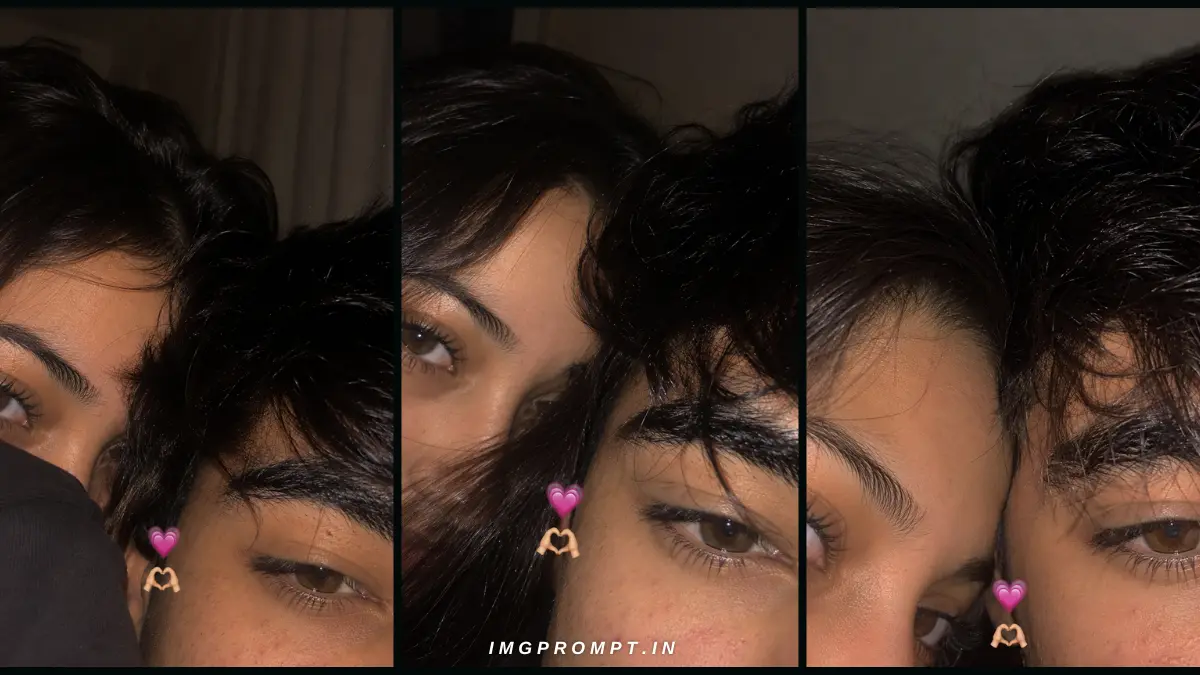
The AI Couple Selfie trend is rapidly going viral across social media. You may have noticed aesthetic, ultra-realistic couple photos on Instagram feeds, Reels, and Snapchat stories that look exactly like real iPhone flash photography—but they are actually generated by AI. However, creating a perfect, authentic-looking image isn’t easy; it requires precise and optimized AI prompts.
This detailed guide is specifically designed for those who want to use their own (or a partner’s) reference images to create hyper-realistic AI couple photos. These prompts are perfectly suited for advanced AI image generators like Flux, Midjourney, ChatGPT (DALL-E 3), and Stable Diffusion.
In this article, you will not only get the AI prompts, but you will also understand the unique vibe each prompt creates, how to properly use identity reference images (to match faces accurately), and the step-by-step process to achieve the best results. These prompts will help you avoid unnatural, plastic-looking AI images and instead create raw, candid, and Instagram-ready photos.
Table of Contents
What Is an AI Couple Eye Selfie AI Prompt?
An AI Prompt is essentially a text instruction (command) given to an Artificial Intelligence model to generate an image based on our imagination. However, when it comes to a Couple Selfie, text alone isn’t always enough.
If you want the generated photo to feature your face and your partner’s face accurately, this is where Identity Reference Images come into play. Identity reference means providing the AI model with 1-2 real photos of yourself so it can understand your facial features, skin tone, and expressions.
The Benefit of Uploading Two Photos:
When generating a couple’s image, the AI needs to process two different identities. If you upload clear, separate photos of both individuals as references (in tools like Flux or Midjourney), the AI won’t get confused. This maintains Face Consistency, meaning the faces in the final image will perfectly match the original photos.
The Prompt Workflow:
- First, select front-facing photos of yourself and your partner.
- Input these reference photos into your chosen AI tool.
- Copy and paste the optimized text prompts provided below.
- The AI will combine both data points (Photo + Text) to generate an ultra-realistic, flash-lit selfie.
Why iPhone Flash Selfie Style Images Are So Popular
Today, the trend of highly edited, smooth, and professional studio photos has faded. People now prefer a Raw and Candid aesthetic.
- Instagram Story Look: Flash selfies look exactly like a casual photo taken during a night out with friends for an Instagram story. They give off an authentic “in-the-moment” vibe.
- Snapchat Aesthetics: The dark background and harsh flash lighting offer that classic Snapchat memory feel, which is highly popular among Gen-Z and millennials.
- Natural Flash Lighting: An iPhone flash highlights skin textures, minor imperfections, and shadows. These imperfections are exactly what make the photos look real.
- Raw Phone Camera Feel: These images contain a slight digital noise (grain) and blur, which is the true signature of a smartphone camera sensor.
- No AI Appearance: The biggest advantage is that flash lighting hides the “plastic/smooth” AI look. Viewers won’t even realize the photo is AI-generated.
- Social Media DP Trend: This dark, aesthetic, and moody look is currently in top demand for WhatsApp or Instagram Display Pictures (DP).
Before Using These Prompts (Prep Guide)
To get the most realistic results from AI, your input (reference photos) must be top quality. Keep these points in mind before using the prompts:
- Upload Two Clear Face Photos: Provide one photo of each person. Avoid group photos, as they can confuse the AI.
- High-Resolution Images: Ensure the reference photos are HD. Avoid pixelated or blurry images.
- Front-Facing Photos: Use photos where your face is looking straight into the camera. Side profiles make it difficult for AI to match identities.
- Face Visible: Make sure no hair, hands, or harsh shadows are covering the face.
- Similar Age: The reference images should reflect your current age to maintain realism in the final result.
- Good Lighting: Clear photos taken in natural daylight work best.
- No Sunglasses & Accessories: Avoid photos with sunglasses, masks, or heavy hats. AI struggles to generate eyes and foreheads accurately with these on.
- Avoid Heavy Filters: Do not use photos with Instagram or Snapchat beauty filters. The more real your skin texture looks in the input, the more natural the output will be.
Classic Cozy Close-Up Selfie
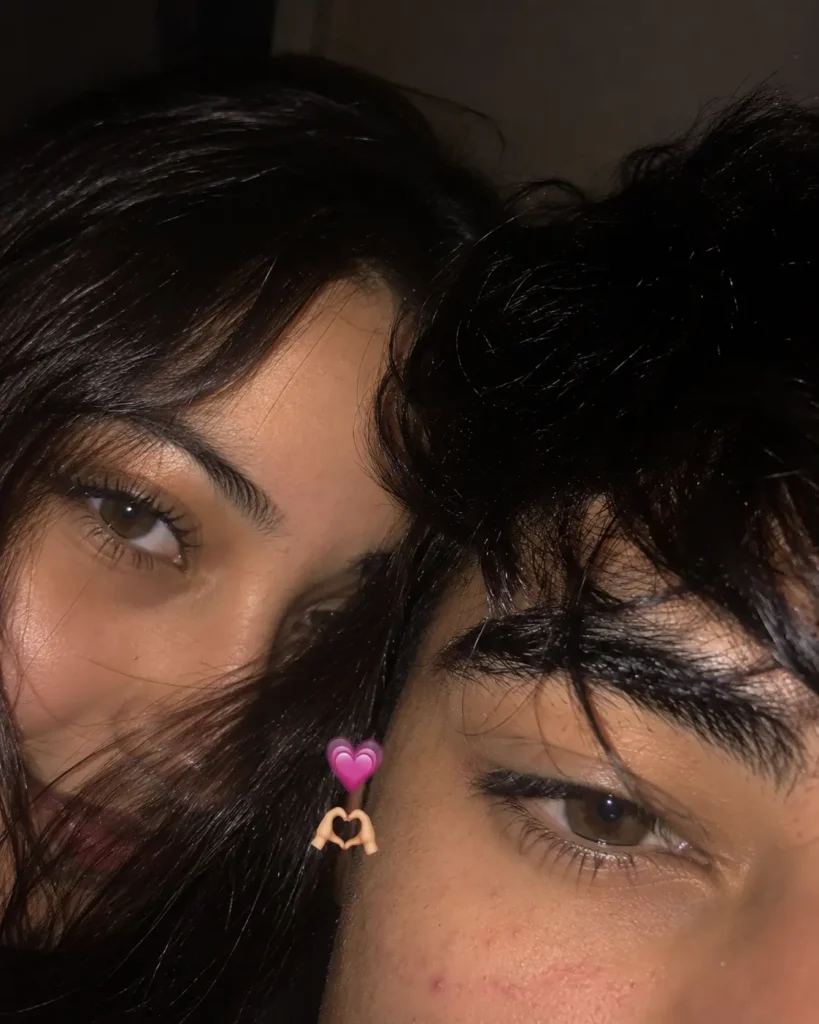
Description:
This prompt generates a highly intimate, casual, and close-up portrait. The camera angle is set exactly as if you were holding your phone out in front of you and snapped a quick photo with the flash on.
The lighting is harsh and direct on the faces, causing the background to become dark and slightly blurry (vignette effect). The mood is incredibly cozy and romantic, with the couple standing very close together, looking directly at the camera with natural smiles. The close framing makes this photo perfect for social media profiles because the faces remain clear even after a circle crop.
IMPORTANT: TWO REFERENCE IMAGES ARE MANDATORY.
Use the two uploaded reference images as the ONLY identity references.
IDENTITY LOCK (HIGHEST PRIORITY):
– Preserve the exact facial identity of both people from their respective reference images.
– Do not change their face shape, eye shape, eyebrows, nose, lips, ears, jawline, skin tone, age, hairstyle (unless explicitly requested), or unique facial features.
– Maintain 100% facial resemblance for both individuals.
– Do not blend, swap, or invent facial features.
– The final image must clearly look like the exact same two people from the uploaded photos.
SCENE:
Create an ultra-realistic candid iPhone front-camera flash selfie of both people standing extremely close together. Their faces are naturally pressed side by side in a cozy, intimate composition. Only the upper half of their faces is visible due to very tight framing, as if the phone was accidentally held too close while taking an Instagram Story selfie.
FACE DETAILS:
– Left person: one eye fully visible with long natural eyelashes.
– Right person: soft messy black bangs partially covering one eye.
– Warm hazel-brown eyes with realistic catchlights from the phone flash.
– Natural skin pores, faint acne marks, tiny freckles, slight under-eye texture, subtle imperfections, and realistic facial details.
– Loose baby hairs and natural hair strands crossing the forehead.
– Relaxed, soft expressions with authentic eye contact.
CAMERA STYLE:
– Looks exactly like a real iPhone front-camera flash selfie.
– Vertical 4:5 composition.
– Extremely close framing.
– Authentic smartphone HDR processing.
– Slight overexposed flash highlights.
– Mild motion blur.
– Imperfect focus.
– Soft lens blur around the edges.
– Natural digital sensor noise.
– Slight handheld camera shake.
– Realistic skin tones.
– No studio lighting.
– No professional photography look.
– No AI-generated appearance.
LIGHTING:
Late-night indoor room with the phone flash as the primary light source. Soft shadows, warm ambient background, realistic flash reflections in the eyes, slightly dark surroundings, cozy nighttime atmosphere.
COMPOSITION:
– Both heads gently touching.
– Tiny pink heart emoji (🩷) and heart-hands emoji (🫶) placed naturally between both faces.
– Background softly blurred.
– Looks like an accidental Instagram Story selfie taken by friends or a couple.
QUALITY:
Hyper-realistic, photorealistic, RAW smartphone photo, cinematic but natural, realistic skin texture, authentic imperfections, DSLR quality realism with smartphone characteristics, indistinguishable from a genuine iPhone selfie.
NEGATIVE PROMPT:
AI look, plastic skin, beauty filter, over-sharpening, extra fingers, extra eyes, duplicate face, distorted face, incorrect identity, cartoon, painting, CGI, 3D render, anime, wax skin, unrealistic lighting, oversaturated colors, smooth skin, watermark, text, logo, low quality, blurry face, facial asymmetry, face fusion, identity change.
Best For:
- Instagram DP (Profile Picture)
- Couple Profile Matching (For Discord/Gaming)
- WhatsApp DP
- Telegram DP
Romantic Peek Pose Selfie
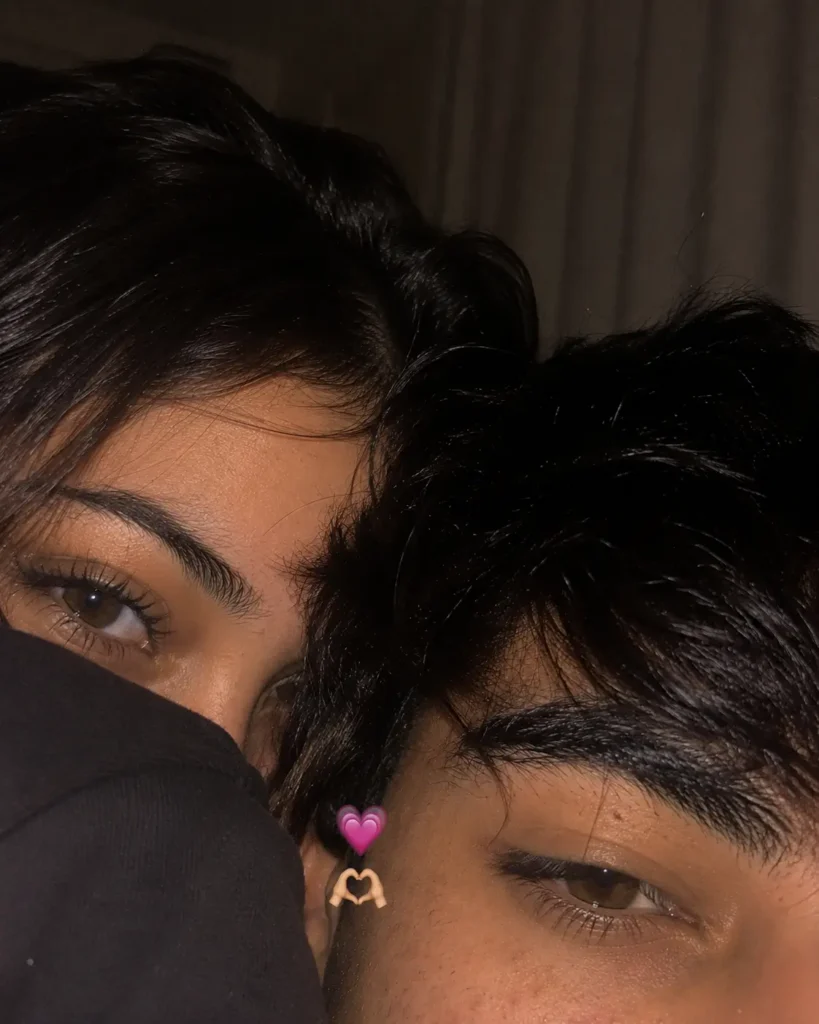
Description:
If you want to try something a bit more fun, playful, and aesthetic, this prompt is perfect. In this pose, one person stands in the front holding the phone, while the other person peeks from behind (over the shoulder).
We’ve included a “hoodie pose” element in this prompt, where one partner playfully hides half of their face behind the other’s shoulder or hoodie, leaving only one eye and a soft smile visible. It provides a highly natural, candid look that doesn’t feel staged. The flash ensures the person in the front is brightly lit, while soft shadows fall on the person behind, adding depth to the image.
IMPORTANT: TWO REFERENCE IMAGES ARE MANDATORY.
Use the two uploaded reference images as the ONLY identity references.
IDENTITY LOCK (HIGHEST PRIORITY):
– Preserve the exact facial identity of both people with 100% facial resemblance.
– Do not alter face shape, skin tone, hairstyle, eyebrows, eye shape, nose, lips, ears, jawline, or any unique facial features.
– No face blending, face swapping, identity mixing, or AI-generated facial changes.
– Both people must look exactly like the uploaded reference photos.
SCENE:
Create an ultra-realistic candid iPhone front-camera flash selfie of two young people in a **completely different and unique pose**. The right person is positioned slightly in front while looking downward toward the phone with a calm expression. The left person stands behind and gently hides half of their face behind their oversized black hoodie sleeve, revealing only one beautiful eye and eyebrow while slightly peeking toward the camera. Their heads naturally lean together, creating a warm, intimate, and spontaneous composition. The framing is extremely close so only the upper half of both faces is visible.
FACE DETAILS:
– Left person: one eye fully visible with long natural eyelashes and soft black hair falling across the forehead.
– Right person: messy black textured hair with soft bangs partially covering one eyebrow.
– Warm hazel-brown eyes with realistic flash reflections.
– Natural skin pores, faint acne marks, tiny freckles, slight under-eye texture, authentic imperfections, baby hairs, loose hair strands, realistic eyebrows, and subtle facial texture.
– Relaxed expressions with natural eye movement.
CAMERA STYLE:
– Looks exactly like a real iPhone front-camera flash selfie.
– Vertical 4:5 composition.
– Extremely close crop.
– Authentic smartphone HDR processing.
– Slight flash overexposure on the forehead and cheeks.
– Mild handheld motion blur.
– Natural lens softness.
– Realistic digital sensor noise.
– Slight compression artifacts.
– Imperfect framing.
– Slightly tilted camera angle.
– RAW smartphone photo aesthetics.
– Looks like an accidental Instagram Story selfie.
LIGHTING:
Late-night indoor room illuminated only by the iPhone front-camera flash. Warm ambient shadows, realistic flash reflections in the eyes, slightly dark blurred background, soft cinematic mood, cozy bedroom atmosphere.
COMPOSITION:
– One person hides behind the hoodie sleeve while peeking.
– The other naturally leans forward.
– Heads gently touching.
– Tiny pink heart emoji (🩷) and heart-hands emoji (🫶) floating naturally between both faces.
– Soft blurred background.
– Feels genuine, unposed, candid, and emotionally warm.
QUALITY:
Ultra photorealistic, RAW smartphone photo, cinematic realism, authentic skin texture, realistic imperfections, natural color grading, no beauty filter, no AI appearance, indistinguishable from a genuine iPhone selfie uploaded to Instagram.
NEGATIVE PROMPT:
AI look, beauty filter, plastic skin, wax skin, over-sharpening, oversaturated colors, face swap, identity change, duplicate face, face fusion, extra eyes, extra nose, distorted face, cartoon, anime, CGI, painting, 3D render, unrealistic lighting, watermark, logo, text, low resolution, blurry face, unnatural skin smoothing, fake HDR, perfect symmetry.
Best For:
- Instagram Story (Add text or song overlays)
- Couple Reels (Before/After trends)
- Pinterest Mood Boards
- Phone Wallpapers
Late Night Flash Aesthetic Selfie
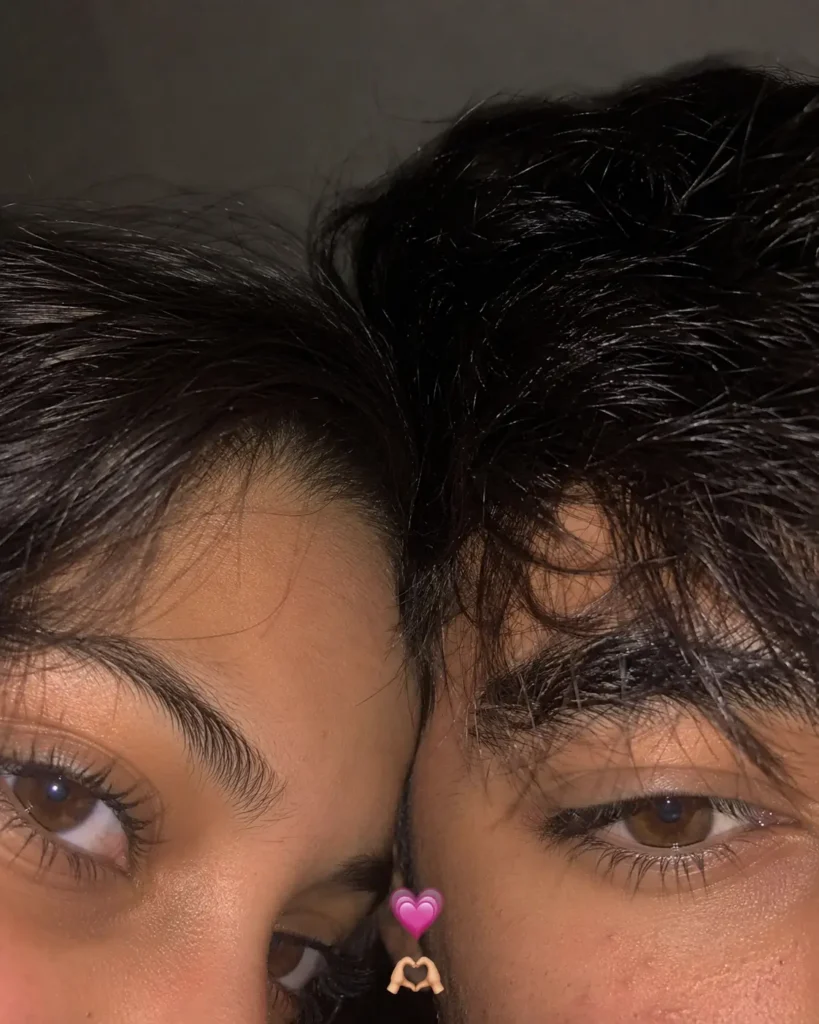
Description:
This prompt is for couples who love dark, cinematic, and “late-night drive” vibes. The pose here is slightly different and more emotional. The couple is touching foreheads, and their eyes are either closed or looking deeply into the camera lens.
Messy hair, a low-light environment, and a cozy mood are the soul of this photo. This prompt intentionally adds a bit of blur and color noise to make the image look 100% like a “Real iPhone Flash” shot. The aesthetic is so strong that anyone would refuse to believe it was generated by AI.
IMPORTANT: TWO REFERENCE IMAGES ARE MANDATORY.
Use the two uploaded reference images as the ONLY identity references.
IDENTITY LOCK (HIGHEST PRIORITY):
– Preserve the exact facial identity of both people.
– Maintain 100% facial resemblance.
– Do not change facial structure, skin tone, hairstyle, age, eyebrows, nose, lips, jawline, or any unique facial features.
– No face blending or identity changes.
SCENE:
Create an ultra-realistic candid iPhone front-camera flash selfie of both people in a **different pose**. The left person is slightly behind the right person, gently leaning forward so their foreheads lightly touch. Both are looking into the phone camera with soft natural smiles. The framing is extremely close so only the upper half of their faces is visible, creating a warm and intimate composition.
FACE DETAILS:
– Left person has one eye fully visible with naturally long eyelashes.
– Right person has soft messy black bangs partially covering one eye.
– Warm hazel-brown eyes with realistic flash reflections.
– Natural skin pores, faint acne marks, tiny freckles, subtle imperfections, realistic lips, authentic eyelashes, loose hair strands, and natural facial texture.
CAMERA STYLE:
– Looks exactly like a genuine iPhone front-camera flash selfie.
– Vertical 4:5 aspect ratio.
– Extremely close framing.
– Authentic smartphone HDR processing.
– Slight overexposed flash.
– Tiny motion blur from handheld shooting.
– Slight lens softness around the edges.
– Natural digital sensor noise.
– Imperfect focus like a real phone photo.
– Realistic smartphone compression artifacts.
LIGHTING:
Late-night indoor room with the phone flash as the only light source. Soft warm shadows, realistic flash highlights on the forehead and cheeks, dark blurred background, cozy nighttime atmosphere.
COMPOSITION:
– One person slightly behind the other.
– Heads gently touching.
– Tiny pink heart (🩷) and heart-hands (🫶) emoji floating naturally between both faces.
– Soft background blur.
– Looks like an accidental Instagram Story selfie.
– Casual, candid, romantic, and unposed.
QUALITY:
Ultra photorealistic, RAW smartphone photo, cinematic realism, natural skin texture, authentic imperfections, no editing, no beauty filter, indistinguishable from a real iPhone selfie uploaded to Instagram.
NEGATIVE PROMPT:
AI look, plastic skin, beauty filter, oversharpened, face swap, identity change, face fusion, duplicate face, extra eyes, extra nose, extra fingers, unrealistic lighting, cartoon, anime, CGI, painting, wax skin, watermark, text, logo, low quality, distorted face, overprocessed HDR.
Best For:
- Romantic video edits
- Couple memory digital albums
- Late-night social media posts / dumps
- Lock screen wallpaper
Which AI Image Generator Gives the Best Results?
Now the question is, where should you use these prompts? There are many tools on the market, but for couple selfies and exact face matching, certain specific models work best:
- Flux (Kontext / Replicate): Currently, Flux is the absolute best model for hyper-realism and face consistency. It understands human skin, flash lighting, and text prompts better than anything else. If you want to match your face perfectly, Flux’s LoRA models and IP-Adapter tools are unmatched. It is the king of both speed and realism.
- Midjourney (v6): Midjourney remains unbeatable for aesthetics and cinematic lighting. If you want exact iPhone flash styles and skin textures, Midjourney produces the most realistic raw photos. You can use the
--cref(Character Reference) parameter to upload your photo and preserve identity. - Google Gemini: Gemini is incredibly fast and user-friendly for image generation. If you want to quickly visualize high-quality prompt ideas without complex setups, Gemini is a great choice. It’s excellent for daily usage and fast prototyping, though direct real-face replacement isn’t supported.
- ChatGPT (DALL-E 3): DALL-E 3 understands text prompts the most deeply and accurately. It will build exactly what you type. However, it can sometimes make images look a bit too “perfect” or animated. This is why our prompts include words like “low quality, digital grain, unedited” to force DALL-E into creating a raw look.
- Stable Diffusion XL (SDXL): If you are a technical user and can run ControlNet or FaceID on your PC, Stable Diffusion is a free and highly powerful tool. You can control every single detail, from lighting and poses to facial features.
How to Get the Most Realistic Results
Generating photos with AI is both an art and a science. For the perfect result, always follow these tips:
- Use 2 HD Images: Only use high-definition, clear images for reference. The AI will only give a good output if it receives a good input.
- Front Camera Photos: For references, use photos taken from a phone’s front camera. Highly edited DSLR photos confuse the AI when it comes to understanding natural skin texture.
- Similar Lighting: Try to ensure the lighting in both the boy’s and girl’s reference photos is similar. AI struggles to match a daylight photo with a nighttime photo.
- Don’t Crop Faces: The entire face, from the top of the hair to the chin, should be visible in the reference photo. Cropped photos can lead the AI to generate disproportioned heads.
- Avoid Beauty Filters: Do not use photos with beauty-plus or heavy makeup filters. Pores, freckles, and minor lines are what make a photo look real.
- Use RAW References: If possible, upload raw, completely unedited photos.
- Maintain Face Visibility: Ensure lighting is evenly distributed across the reference face (half the face shouldn’t be in dark shadows).
- Keep Aspect Ratio 4:5: When generating for Instagram or Pinterest, always set the aspect ratio to Portrait mode (4:5 or 9:16). In Midjourney, use
--ar 4:5.
Common Mistakes That Reduce Image Quality
Many people try AI but end up with artificial, fake-looking results. Here are the mistakes behind that:
- Low-Quality Photos: Using blurry or highly compressed reference images (like those forwarded on WhatsApp) is the biggest mistake.
- Cropped Faces: If half the head or chin is cut off in the reference, the AI will generate a disproportionate body.
- Wrong Camera Angle: Reference photos taken from too low or too high an angle ruin the face-swapping process.
- Too Many Accessories: Hats, masks, and heavy jewelry in the reference photo distract the AI.
- AI Beauty Filters: When AI models receive pre-filtered photos, they tend to make the final result look “cartoonish” or like a digital painting.
- Poor Prompt Engineering: Simply typing “A couple selfie” won’t work. You must describe the lighting, mood, and camera style.
- Different Lighting: Having one character in harsh sunlight and the other in a dark room causes severe lighting mismatches in the final output.
Where Can You Use These AI Couple Photos?
Once you’ve used these prompts to generate stunning AI photos, you can use them effectively across multiple platforms:
- Instagram DP: Gives your profile an aesthetic, mysterious, and trending look.
- Instagram Story: Pair with a black background and lo-fi music for a “late-night dump” vibe.
- WhatsApp DP: Surprise your close friends and family with a new, high-quality picture.
- Facebook Profile: Perfect for a profile update or cover photo.
- Telegram DP: A great way to look cool while maintaining privacy in tech and crypto communities.
- YouTube Community: Vloggers and creators can use these aesthetic photos for audience engagement (polls/updates).
- Pinterest: Ideal for pinning to aesthetic boards or outfit idea boards.
- Phone Wallpaper: Set a cool aesthetic photo of you and your partner as your lock screen.
- Digital Album: Enhance your personal memory collections.
- Anniversary Posts: Post these images on your special day with a unique caption.
Privacy and Safety Tips
The combination of AI tools and personal photos can pose privacy risks. It is crucial to follow these safety guidelines:
- Permission Is Must: Before using anyone else’s photo (whether it’s a friend, partner, or crush) as a reference, always get their explicit permission.
- Avoid Sensitive Images: Never upload sensitive, private, or potentially misusable photos to AI platform servers.
- Review Privacy Policies: Read the privacy policy of the AI tool you are using (e.g., Flux or third-party Midjourney bots). Confirm they aren’t saving your uploaded reference images to train their databases.
- No Misleading Context: Do not share these ultra-realistic photos in a context that promotes a fake event or misinformation. Maintain transparency (let people know it is AI-edited if necessary).
- Secure Storage: Keep your original reference photos and generated AI photos safely stored in secure cloud drives.
Frequently Asked Questions (FAQ)
1. Can I use these prompts for free?
Yes, the prompts are completely free. You can copy and use them on any AI image generator (like Bing Image Creator, Leonardo AI, or free Flux platforms).
2. Which AI generator works best?
For exact face matching and realism, Flux and Midjourney currently provide the best results. If you want direct text-to-image without applying your own face, ChatGPT’s DALL-E 3 is excellent.
3. Why do I need two reference photos?
Because this is a “Couple Selfie.” The AI model needs 2 distinct, clear reference photos to understand the separate facial features of both the boy and the girl, preventing their faces from merging in the final output.
4. Can I change the pose in the prompt?
Absolutely! You can edit the prompt to add phrases like “kiss on forehead,” “laughing together,” or “looking at each other” to change the pose to your liking.
5. Can I use these for Instagram?
Yes, these prompts are specifically designed with Instagram aesthetics (Stories and DPs) in mind. Their lighting style is perfectly Insta-ready.
6. Do these prompts preserve identity?
The text prompt alone doesn’t preserve identity. To do that, you must use a specific AI tool feature (like Midjourney’s --cref or Flux FaceID) where you upload your photo. Then, these prompts will create the exact scene with a 100% identity match.
7. Which aspect ratio is best?
For an Instagram DP, 1:1 (Square) is best. For Stories or portrait photos, a 9:16 or 4:5 aspect ratio is perfect.
8. Can I generate HD images?
Yes, words like “8k resolution” and “highly detailed” are already included in the prompts, signaling the AI to create high-definition outputs. You can also use an upscaler if your tool supports it.
9. Can I use these prompts on mobile?
Definitely. You can open any AI tool’s website or app in your smartphone (Android/iOS) browser, copy-paste these prompts, and generate images directly from your phone.
10. What should I do if the face doesn’t match?
If the face isn’t matching, it usually means your reference photo is flawed. Ensure you use a photo that is well-lit, completely front-facing, and high quality. You can also try switching AI models (e.g., from Midjourney to Flux) and try again.
Final Thoughts
AI generation has become highly advanced, and with the right text prompt, you can create almost anything.
- If you want a neat, tight profile picture, use Prompt 1 (Classic Close-Up).
- If you want a playful, candid, story-type vibe, try Prompt 2 (Peek Pose).
- And if you’re looking for a deep, romantic, and highly aesthetic moody look, Prompt 3 (Late Night Aesthetic) is your best bet.
The core element of all these prompts is “Realism”. They have been carefully designed to mimic iPhone flash and raw photography. Remember, for the best and most realistic results, the quality of your reference images must be top-notch. Don’t be afraid to experiment with poses and lighting setups, try new tools like Flux, and start creating the best AI couple pictures!
Related Articles