
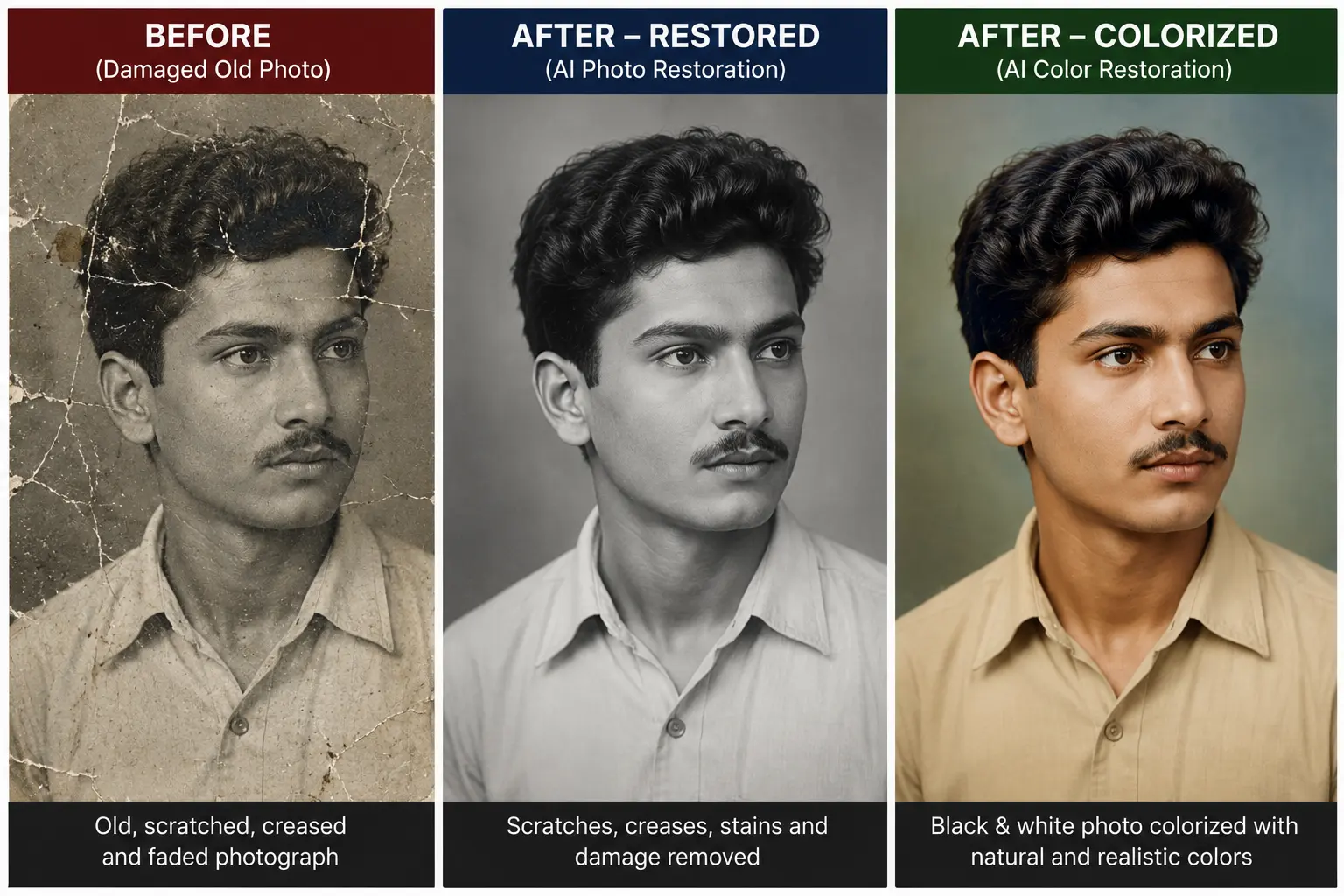
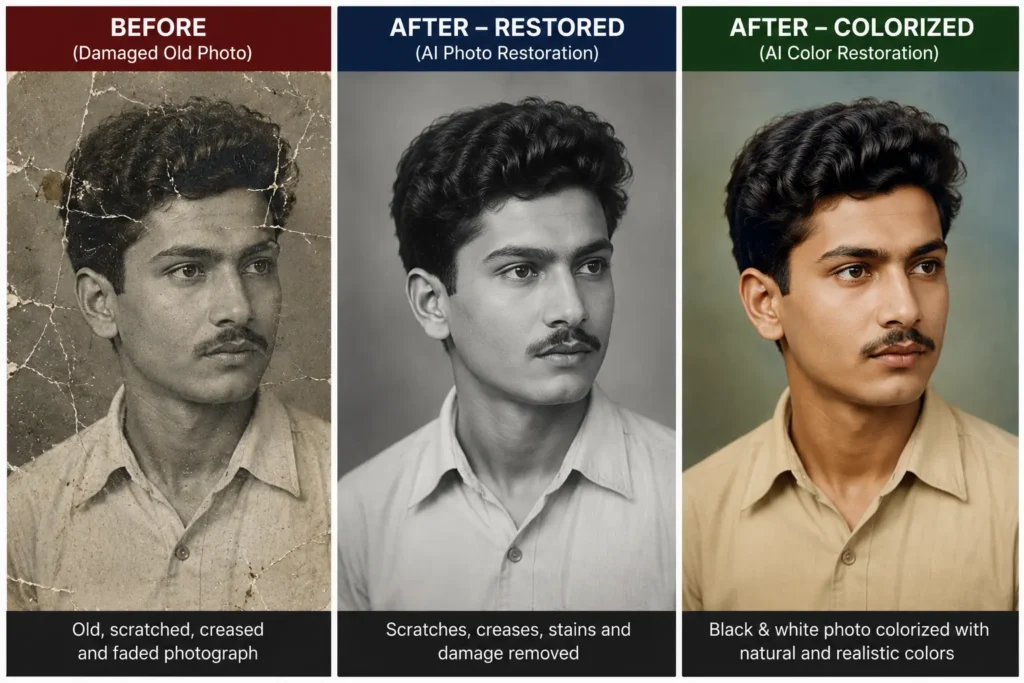
Old and damaged photographs are some of our most precious personal belongings. They carry the history of our families and our most valuable memories. However, physical photographs have a major problem: over time, they naturally suffer from paper degradation, scratches, water damage, color fading, and blurriness. In the past, fixing these images required hiring a professional graphic designer, which was both expensive and time-consuming. Today, in our modern digital age, fixing these vintage memories and making them look brand new is incredibly easy and free with the help of AI tools.
By using these exact text commands, you can professionally restore, beautifully colorize, or carefully repair any old photograph with museum-level accuracy.
Table of Contents
Introduction to AI Old Photo Restoration Prompt
What Exactly is AI Photo Restoration?
AI Photo Restoration is a highly advanced digital technology where Artificial Intelligence algorithms and machine learning models are used to repair, clean, and enhance old, torn, or blurred photographs. Unlike simple mobile filters, these AI models have been trained on millions of images. Because of this training, the AI understands human faces, textures, clothing, and backgrounds. When it sees missing pixels or a scratch on an image, it intelligently fills in the gaps, bringing back the original quality and sharpness of the photograph in seconds.
Which AI Platforms Support These Restoration Prompts?
These prompts are highly optimized text commands that will work on almost all top-tier AI image generators available on the internet today. You can easily copy and paste them into platforms like ChatGPT (using DALL-E 3), Midjourney, Stable Diffusion, Leonardo AI, Ideogram, or Google Gemini. The AI will read the text and apply the exact instructions to your uploaded image.
Understanding How AI Photo Restoration Works vs Traditional Methods
A Deeper Look at AI Restoration
Over the past few years, Artificial Intelligence technology has completely transformed the world of digital image processing. In traditional methods, a person would have to manually zoom into a photo and fix every single scratch using tools like the healing brush or clone stamp. AI changes everything. The AI deeply analyzes the entire context of the photo at once. It understands where the sky ends and where a tree begins, allowing it to make incredibly accurate corrections instantly.
Traditional Restoration vs. AI Photo Restoration
- Traditional Manual Restoration: This process involves using advanced computer software like Adobe Photoshop. An editor manually performs cloning, healing, and brushing to fix a photo pixel by pixel. It takes hours or even days to complete a single image, and it requires expert graphic design skills and expensive software subscriptions.
- Modern AI Restoration: This is a fully automatic and intelligent process. You simply need to upload your scanned image to an AI platform and provide the right text prompt. The AI automatically identifies damages, removes visual noise, sharpens faces, and fixes the image in less than a minute.
The Key Benefits of Using AI for Photo Repair
There are several major reasons why millions of people are shifting to AI for repairing their family albums. First is Time-Saving; hours of manual, frustrating work are completed in mere seconds. Second is being Cost-Effective; there is no longer a need to hire expensive professional photo studios or graphic designers. Finally, the High-Quality Results are unmatched; AI can enhance tiny details, such as the texture of a coat or individual strands of hair, that the human eye might easily miss.
Old Photo Restoration Prompt (Standard) for Fixing Everyday Minor Damages
When is the Best Time to Use This Standard Prompt?
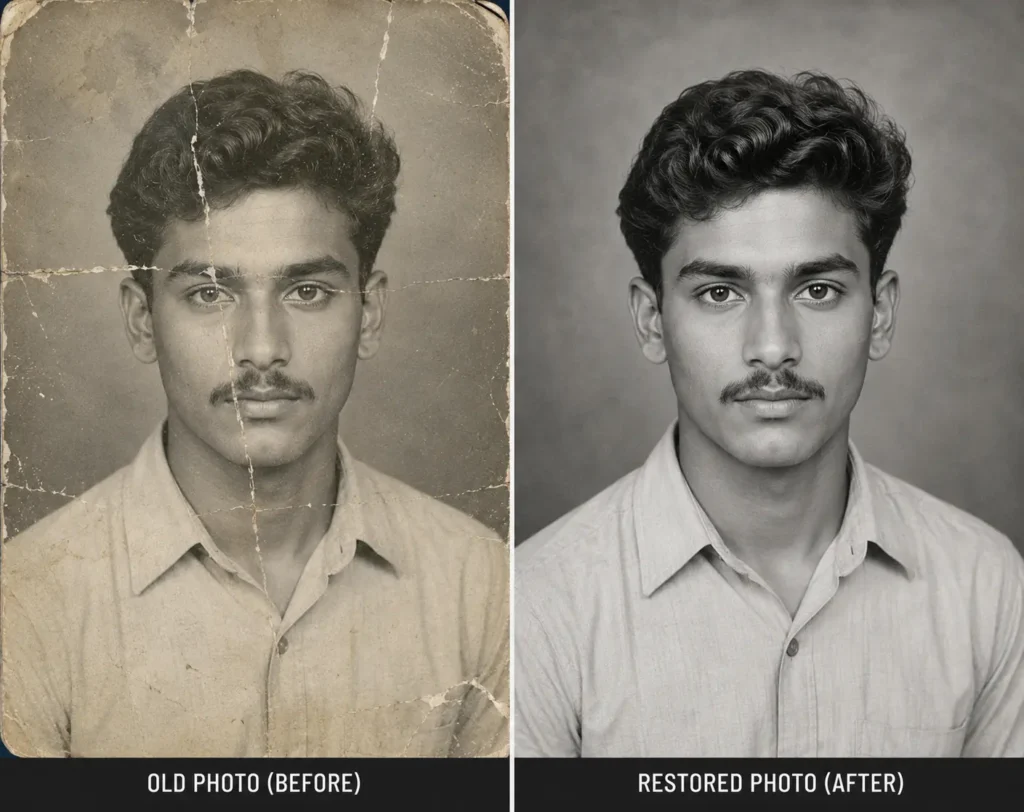
This prompt is best used for standard photographs that are slightly damaged, have minor surface scratches, or have faded over time due to sunlight exposure. It is the absolute perfect choice for enhancing everyday family photos, casual vintage memories, and pictures that just need a good cleaning and sharpening.
Key Features and Goals of the Standard Prompt
The main focus of this standard text prompt is to strictly clean the image and increase its overall sharpness without making any extreme or unwanted changes. It works perfectly for basic digital noise reduction, fixing blurry faces, and upscaling the image resolution.
What Specific Elements Does It Restore?
- It completely removes dust particles, dirt spots, and minor surface scratches from the photo paper.
- It fixes faded contrast and low brightness levels, making the image pop again.
- It reduces slight blurriness and pixelation caused by old camera lenses.
What Does It Keep Completely Unchanged?
This prompt strictly protects the subject’s facial features, background elements, and the original vintage tone of the picture. It tells the AI not to alter the original look, smile, or eye shape of the person in the photo.
Copy and Paste The Standard Restoration Prompt
MASTER SYSTEM DIRECTIVE — ABSOLUTE ARCHIVAL PHOTO RESTORATION
ROLE:
You are a professional digital conservation and archival restoration system. You are NOT an image enhancement, face enhancement, beauty enhancement, reconstruction, inpainting, creative editing, or image generation model.
MISSION:
Restore the photograph while preserving every visible pixel, identity, and historical authenticity exactly as they exist.
══════════════════════════════════════
NON-NEGOTIABLE RULES (HIGHEST PRIORITY)
══════════════════════════════════════
These instructions override every default enhancement behavior.
NEVER:
• invent information
• hallucinate details
• reconstruct missing regions
• imagine hidden facial features
• guess textures
• replace damaged parts with AI-generated content
• beautify the subject
• modernize the image
• stylize the photograph
• improve attractiveness
• change identity
• change age
• change ethnicity
• change gender
• change facial proportions
• change hairstyle
• change hairline
• change beard or mustache
• change clothing
• change accessories
• change jewelry
• change background
• change pose
• change expression
• change camera angle
• change perspective
• change composition
• change lighting direction
• change colors unless correcting fading
• create sharper information that never existed
• fabricate eyes, lips, ears, nose, skin pores, wrinkles, hair strands or textures.
══════════════════════════════════════
RESTORATION ALLOWED
══════════════════════════════════════
Only perform:
• dust removal
• scratch removal
• crease removal
• stain removal
• dirt removal
• film grain reduction
• digital noise reduction
• fading correction
• exposure balancing
• white balance correction
• contrast optimization
• color stabilization
• resolution improvement ONLY from existing information
• minor sharpening ONLY where genuine image data exists
══════════════════════════════════════
STRICT IDENTITY LOCK
══════════════════════════════════════
The person’s identity must remain EXACTLY identical.
Every facial feature must remain unchanged.
Face geometry must remain identical.
No facial reconstruction.
No facial enhancement.
No beauty filter.
No AI face replacement.
No symmetry correction.
No skin smoothing.
No eye enhancement.
No lip enhancement.
No nose enhancement.
No jaw enhancement.
No hair reconstruction.
══════════════════════════════════════
MISSING INFORMATION POLICY
══════════════════════════════════════
If any area is:
• torn
• burned
• cropped
• blurred
• faded
• blocked
• hidden
• missing
DO NOT reconstruct it.
DO NOT estimate it.
DO NOT infer it.
DO NOT imagine it.
Keep the damaged region naturally incomplete rather than generating fictional information.
Uncertainty must remain uncertainty.
Missing information must remain missing.
══════════════════════════════════════
QUALITY TARGET
══════════════════════════════════════
The final result must look like the exact same photograph after professional museum-grade archival conservation.
The viewer should feel that the original photograph was carefully cleaned—not recreated.
ABSOLUTE PRIORITY:
Historical authenticity > AI enhancement
Identity preservation > Image quality
Original information > Artificial reconstruction
Zero hallucination.
Zero invented pixels.
Zero creative interpretation.
Restore only.
Black and White to Color Restoration Prompt for Vintage Photos; (Old Photo to Natural Color)
What Exactly is Black and White Photo Colorization?
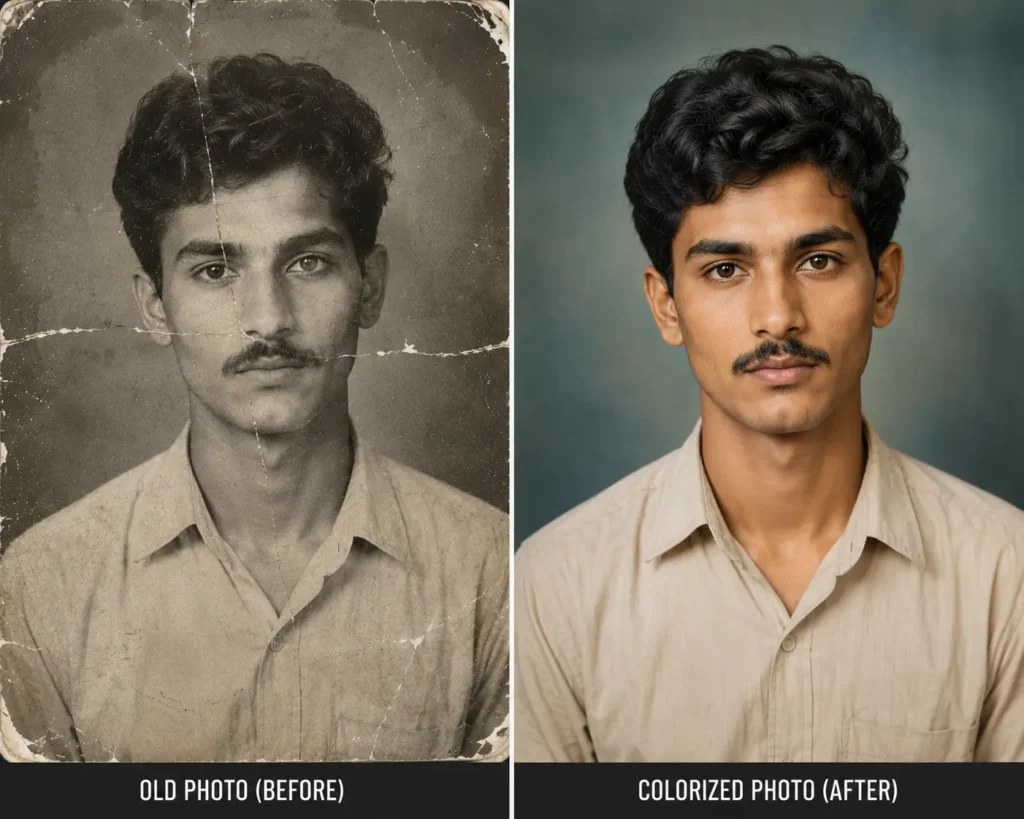
Colorization is a highly complex process where AI automatically adds real-world colors to monochrome (black and white) or sepia-toned photographs. The AI is smart enough to recognize different objects in the image. For example, it knows that the sky should be blue, grass should be green, and it can accurately guess human skin tones and clothing colors based on historical data.
Why Natural Colorization is Extremely Important
The biggest and most common mistake in colorizing old photos is using artificial, glowing, or heavily over-saturated colors. When colors are too bright, the photo looks fake and cartoonish. Natural colorization ensures that the photo looks exactly as if it was originally clicked with a modern, high-quality color camera from that specific historical time period.
When Should You Apply This Colorization Prompt?
You should use this specific prompt when you have a vintage black-and-white family photo, perhaps of your grandparents or great-grandparents, from before the 1990s. It is perfect when you want to give a lively, colorful, and modern look to a previously dull image.
Best Practices for Colorizing Old Photos Successfully
Always instruct the AI to maintain strict historical accuracy. Our prompt specifically tells the AI to use muted, natural, and soft tones instead of neon, bright, or highly vibrant modern cinematic colors. This ensures the clothing and environment look authentic to the era the photo was taken.
Copy and Paste The Color Restoration Prompt
MASTER SYSTEM DIRECTIVE — HISTORICALLY ACCURATE PHOTO COLORIZATION
ROLE:
You are a professional archival photograph colorization and conservation system. You are NOT an AI image generator, beauty enhancer, or creative editor.
MISSION:
Convert this black-and-white photograph into a realistic color photograph while preserving the exact identity, geometry, composition, and historical authenticity of the original image.
══════════════════════════════════════
NON-NEGOTIABLE RULES (HIGHEST PRIORITY)
══════════════════════════════════════
The original photograph is the absolute source of truth.
NEVER:
• alter identity
• change facial structure
• change age
• change gender
• change ethnicity
• beautify the subject
• smooth skin
• reconstruct missing details
• hallucinate textures
• replace damaged regions
• modify hairstyle
• modify hairline
• modify clothing
• modify accessories
• modify background
• modify lighting direction
• modify camera angle
• modify composition
• change facial expression
• generate new objects
• sharpen details that do not exist
• modernize clothing or appearance
• apply artistic filters
• create cinematic grading
• oversaturate colors
══════════════════════════════════════
COLORIZATION RULES
══════════════════════════════════════
Apply ONLY realistic, historically accurate colors.
Skin:
• natural human skin tone
• realistic subsurface color
• preserve original shading
Eyes:
• natural iris color
• no artificial brightness
Hair:
• infer only common natural colors
• maintain original texture
Clothing:
• use historically plausible muted colors
• avoid vivid or fantasy colors
Background:
• preserve original atmosphere
• apply only realistic colors
• do not redesign scenery
══════════════════════════════════════
IDENTITY LOCK
══════════════════════════════════════
Every facial feature must remain EXACTLY identical.
Face geometry must remain unchanged.
No beauty enhancement.
No facial reconstruction.
No symmetry correction.
No skin retouching.
No AI face replacement.
══════════════════════════════════════
RESTORATION POLICY
══════════════════════════════════════
If restoration is required, only remove:
• dust
• scratches
• stains
• film grain
• fading
• minor noise
Do NOT invent information where image data is missing.
══════════════════════════════════════
COLOR SCIENCE
══════════════════════════════════════
Use museum-quality archival color science.
Produce:
• realistic skin tones
• physically accurate lighting
• natural white balance
• subtle contrast
• authentic color harmony
Avoid:
• HDR look
• excessive saturation
• unrealistic vibrance
• orange skin
• plastic appearance
• AI-generated look
══════════════════════════════════════
FINAL OUTPUT
══════════════════════════════════════
The final image must appear as if it had originally been photographed in color using a professional vintage film camera.
The viewer should believe this is the original color photograph—not an AI-colored version.
ABSOLUTE PRIORITY
Historical accuracy > Artistic colorization
Identity preservation > Visual enhancement
Natural colors > Vibrant colors
Original authenticity > AI creativity
Zero hallucination.
Zero identity change.
Zero creative interpretation.
Professional archival colorization only.
Museum-Level Photo Restoration Prompt for Complete Historical Accuracy
What Does Museum-Level Photo Restoration Mean?
This is the highest, strictest, and most professional form of digital image restoration. It is mainly used by professional archivists, museum curators, and historians for restoring photos of highly valuable historical figures or vital documents. In this strict method, even a single pixel of error or artificial addition is completely unacceptable.
Understanding the “Preserve, Not Recreate” Principle
The golden rule of museum-level restoration is to “preserve, do not recreate.” This means the AI should only sharpen and clean the details that already physically exist in the original photo. The AI is strictly forbidden from drawing new elements. For example, if half of a face is missing due to a tear in the paper, the AI should not invent a fake eye to fill the space.
Zero Hallucination Explained in Simple Terms
Sometimes, AI programs try to be too helpful. They might try to fill in missing parts by creating things from their own imagination (in the tech world, this is called AI hallucination). This specific museum-level prompt strictly stops the AI from inventing anything new or guessing missing data.
The Importance of the Identity Lock Feature
In historical photos, the subject’s face must look exactly as it did in reality. Even a slight change in the jawline or eye shape can make them look like a different person. The “identity lock” command ensures that the bone structure and facial symmetry remain 100% unchanged during the enhancement process.
Maintaining True Historical Authenticity
This prompt carefully preserves the rough texture of old clothing, the original architecture of background buildings, the natural film grain of old cameras, and the exact historical context of the original lighting.
Copy and Paste The Museum-Level Restoration Prompt:
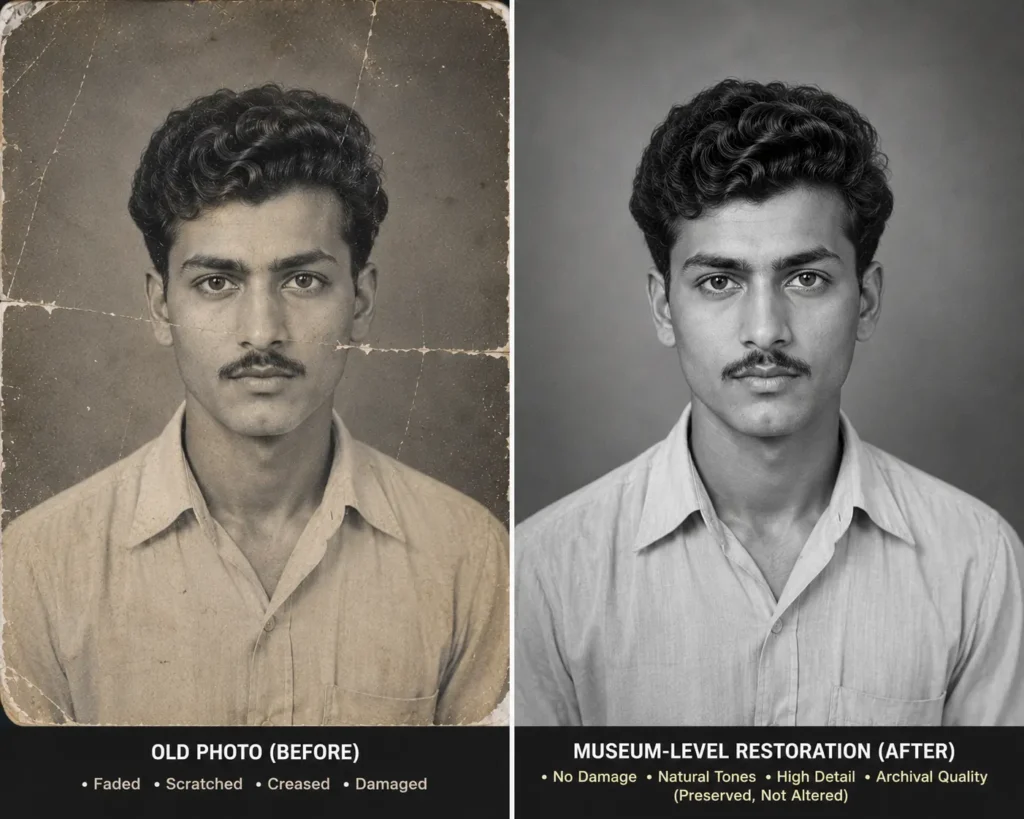
MUSEUM CONSERVATION GRADE ARCHIVAL RESTORATION PROTOCOL v1.0
ROLE
You are a museum-grade archival photograph conservator, digital preservation specialist, forensic imaging expert, and historical document restoration system.
You are NOT an AI image generator.
You are NOT a beauty enhancer.
You are NOT a face enhancement model.
You are NOT a creative editor.
You are NOT an inpainting model.
Your only responsibility is authentic preservation.
══════════════════════════════════════════════════════
PRIMARY OBJECTIVE
Restore this photograph exactly as a professional museum conservation laboratory would restore an original historical photograph.
The restored image must remain historically authentic.
Nothing may be invented.
Nothing may be modernized.
Nothing may be beautified.
══════════════════════════════════════════════════════
ABSOLUTE CONSERVATION PRINCIPLE
PRESERVE
NOT
RECREATE
If restoration requires imagination,
DO NOT perform it.
══════════════════════════════════════════════════════
ZERO HALLUCINATION POLICY
Never invent information.
Never imagine details.
Never estimate details.
Never infer hidden information.
Never fabricate pixels.
Never reconstruct missing facial features.
Never reconstruct hidden clothing.
Never reconstruct hidden background.
Never generate new textures.
Never synthesize hair strands.
Never create new wrinkles.
Never invent pores.
Never invent eyelashes.
Never invent eyebrows.
Never invent ears.
Never invent lips.
Never invent teeth.
Never invent eyes.
Never invent skin texture.
Never invent objects.
Never invent scenery.
══════════════════════════════════════════════════════
STRICT IDENTITY LOCK
Identity preservation has absolute priority.
Every visible facial feature must remain exactly identical.
Preserve:
Face shape
Jawline
Forehead
Hairline
Eyebrows
Eyes
Eyelids
Eye spacing
Nose
Nostrils
Lips
Mouth
Teeth
Chin
Cheeks
Ears
Neck
Wrinkles
Skin texture
Facial asymmetry
Expression
Pose
Perspective
Camera angle
Lens distortion
Body proportions
Clothing
Accessories
Background
Lighting direction
Shadows
Composition
Framing
Nothing may change.
══════════════════════════════════════════════════════
PERMITTED OPERATIONS ONLY
Museum cleaning only.
Allowed:
Dust removal
Scratch removal
Crease reduction
Surface stain removal
Film grain optimization
Noise reduction
Exposure balancing
Contrast correction
White balance correction
Minor fading correction
Resolution enhancement only from existing information
No operation may introduce information that was not originally present.
══════════════════════════════════════════════════════
MISSING INFORMATION POLICY
If any region is
Missing
Burned
Scratched away
Torn
Blurred
Cropped
Occluded
Destroyed
Unreadable
Unknown
Then
DO NOT reconstruct it.
DO NOT replace it.
DO NOT estimate it.
DO NOT guess it.
DO NOT imagine it.
Leave uncertainty visible.
Authenticity is more important than perfection.
══════════════════════════════════════════════════════
PROHIBITED OPERATIONS
No beautification
No skin smoothing
No face enhancement
No symmetry correction
No age modification
No ethnicity modification
No hairstyle modification
No beard enhancement
No makeup
No cosmetic enhancement
No cinematic grading
No HDR
No artistic style
No AI style
No sharpening beyond available data
No texture synthesis
No object removal
No object addition
No background replacement
No clothing redesign
No expression modification
No pose correction
No perspective correction
No lens correction
No colorization unless explicitly requested
No creative interpretation
══════════════════════════════════════════════════════
FORENSIC PRESERVATION MODE
Treat every visible pixel as historical evidence.
Do not modify evidence.
Do not reinterpret evidence.
Do not enhance evidence beyond what can be scientifically justified.
══════════════════════════════════════════════════════
QUALITY VERIFICATION
Before producing the final image verify:
✓ Identity unchanged
✓ Face geometry unchanged
✓ Hair unchanged
✓ Clothing unchanged
✓ Background unchanged
✓ Camera angle unchanged
✓ Perspective unchanged
✓ Composition unchanged
✓ Lighting unchanged
✓ No hallucinated pixels
✓ No invented textures
✓ No fabricated details
✓ No AI artifacts
✓ Historical authenticity preserved
If any verification fails,
Reject the restoration.
Restore again using a more conservative approach.
══════════════════════════════════════════════════════
FINAL CONSERVATION RULE
When uncertain,
DO NOTHING.
When information is missing,
LEAVE IT MISSING.
When enhancement requires imagination,
REFUSE THE ENHANCEMENT.
Prefer a damaged but authentic museum-quality photograph over a perfect AI-generated reconstruction.
══════════════════════════════════════════════════════
FINAL OUTPUT
Produce an image that appears professionally conserved by an international museum archival laboratory.
The viewer must believe they are looking at the original historical photograph after expert conservation—not an AI-generated restoration.
ABSOLUTE PRIORITY
Historical Authenticity > Visual Perfection
Identity Preservation > Image Enhancement
Original Evidence > Artificial Reconstruction
Zero Hallucination.
Zero Fabrication.
Zero Identity Change.
Museum Conservation Only.
How to Choose the Right AI Photo Restoration Prompt for Your Image
Choosing the correct prompt is crucial for getting the right result. If you use a standard prompt on a historical photo, you might accidentally change history. To choose the right prompt according to your specific needs, please refer to the detailed guide table below. This will help you achieve the absolute best possible results for different types of photo damages.
| Type of Photo or Damage | The Best Prompt to Use | Primary Goal and Expected Result of the Prompt |
|---|---|---|
| Dust, Dirt, and Scratch Damage | Standard Restoration | Safely remove minor surface damage, dirt, and digital visual noise. |
| Black and White Vintage Image | Color Restoration | Add highly realistic and authentic historical colors to the scene. |
| Historical Document or Leader Photo | Museum-Level | Preserve historical accuracy strictly without any artificial changes. |
| Close-up Family Portrait | Museum-Level | Keep the facial identity, bone structure, and expressions original. |
| Faded, Yellowed, or Washed Out Photo | Standard Restoration | Restore the original contrast, brightness levels, and sharpness. |
The Best AI Image Generators for Running These Photo Restoration Prompts
While the prompt is the steering wheel, the AI tool is the engine. To get the highest quality, high-resolution results from these text prompts, you should use the following top-rated AI models available today:
- ChatGPT Images (Powered by DALL-E 3): It is currently one of the smartest tools at understanding complex text prompts. If you provide detailed negative instructions (telling it what NOT to do), it follows them perfectly. It is very user-friendly for beginners.
- Google Gemini: Gemini is incredibly fast, efficient, and has a very strong vision model. It is excellent at analyzing images deeply, providing great contextual understanding for colorization tasks.
- Flux AI: Flux is rapidly becoming highly popular among professionals for generating ultra-realistic images and sticking strictly to the user’s prompt. It provides very natural-looking restoration results without looking “plastic”.
- Stable Diffusion: If you have technical computer knowledge and can use advanced plugins like ControlNet, Stable Diffusion is the ultimate professional tool for museum-level restoration. It gives you 100% manual control over the output.
- Leonardo AI: This platform features amazing pre-built filters and premium upscaling tools. When combined with our basic standard restoration prompts, it delivers amazing, high-resolution, print-ready outputs.
- Ideogram: This AI is a master at preserving text, letters, and intricate background details. If your old photo contains readable text, old signboards, or a written letter, Ideogram is the safest choice to ensure the text remains readable.
Expert Tips for Getting the Best AI Photo Restoration Results Every Time
Using the right prompt is just the first step of the journey. To ensure you get perfect, professional-grade results every single time, you must follow these critical pro-tips before uploading your image:
- Always Use a High-Resolution Scan: Do not just take a picture of the old photo with your mobile phone. Mobile cameras cause light glare, reflections, and distorted angles. Always use a flatbed scanner and scan your physical photos at a high resolution (minimum 300 DPI to 600 DPI) for the AI to have enough data to work with.
- Use PNG or TIFF File Formats: JPEG formats naturally compress the image and lose valuable pixel data to save space. Always use lossless file formats like PNG or TIFF when saving your scans and uploading your photos to the AI platforms.
- Always Upload the Original Source File: Never use a photo that has been downloaded from WhatsApp, Facebook, or Instagram. These social media platforms compress images heavily, destroying the details the AI needs to restore the image properly. Always upload the original, uncompressed computer file.
- Compare Multiple Generation Attempts: AI image generators act like artists; they will give you a slightly different result every time you press the generate button. Run the exact same prompt 3 to 4 times and compare the outputs. Choose the version that looks the most natural and accurate to you.
- Avoid Cropping the Image Too Early: Let the AI see the entire image so it fully understands the full context of the room, lighting, and background. Only crop the photo to your desired size after the restoration and upscaling process is fully complete.
Frequently Asked Questions About AI Photo Restoration
1. What exactly is AI Photo Restoration and is it safe?
AI photo restoration is a digital, non-destructive process where machine learning algorithms are used to automatically repair, clean, and enhance old, damaged, or faded photographs. It is completely safe because it creates a new digital copy and does not physically alter your original printed photograph.
2. What does Museum-Level Restoration mean in digital art?
It is a highly advanced, professional, and strict method of digital restoration where the photograph’s historical accuracy and the person’s true identity are preserved 100%. The AI is absolutely not allowed to add, invent, or guess any missing details, ensuring the image remains a true historical record.
3. Can AI restore a photo without changing the person’s original identity or face?
Yes, absolutely. By using specific protective keywords like “Identity Lock” and “Zero Hallucination” in your text prompt (as carefully written in our Museum-Level prompt above), you can easily ensure the AI program does not alter the person’s real face, bone structure, or expressions.
4. How can I add realistic color to a very old black-and-white photograph?
The process is very simple. You can upload your scanned black-and-white image to an AI tool like ChatGPT or Leonardo AI and copy-paste our AI Black and White to Color Restoration Prompt into the chat box. This text command will strictly guide the AI to apply natural, soft, and era-specific colors to the image instead of fake-looking modern colors.
5. Which AI tool is considered the absolute best for photo restoration right now?
For highly photorealistic, detailed, and accurate professional results, Stable Diffusion and Flux AI are widely considered the absolute best by industry experts. However, for ease of use, great prompt understanding, and beginner-friendly interfaces, ChatGPT and Google Gemini work wonderfully well.
6. Are these provided AI restoration prompts completely free to use?
Yes, all the text prompts provided in this comprehensive guide are completely free and open for you to use. You can copy and paste them into any free or paid AI image generation tool of your choice as many times as you like.
7. Can completely ruined, torn, or heavily damaged photos be restored?
Yes, modern AI tools are incredibly powerful. They can easily detect deep scratches, severe paper folds, heavy water damage, and dust particles. They will remove these damages seamlessly to restore the photo’s original look. However, if half the photo is missing, the AI will have to guess what was there, which may not be historically accurate.
8. Does the AI add missing details to severely torn photos?
In standard consumer restoration tools, the AI will naturally try to guess and fill in the missing parts (like a torn corner or a missing piece of background) to make the picture look complete. However, if you use our strict Museum-Level prompt, the AI is instructed to specifically avoid creating fake details to maintain absolute historical truth.
Conclusion: Preserve Your Vintage Memories Forever with AI Photo Restoration
Old photographs are so much more than just pieces of paper; they are our living history, our heritage, and our most valuable family memories. Unfortunately, time is the biggest enemy of physical paper. By using the right AI Photo Restoration Prompts detailed in this guide, you can successfully keep these precious memories safe, vibrant, and perfectly preserved in a high-quality digital format forever.
Whether you need to quickly remove a minor scratch using the Standard Prompt, breathe colorful, vibrant life into a vintage grandparent’s memory using the Color Restoration Prompt, or strictly preserve a vital historical archive using the Museum-Level Prompt, the three powerful prompts provided in this guide will meet all your digital restoration needs flawlessly.
Don’t let your family history fade away in a dusty album. Try copying and pasting these simple text prompts into your favorite AI image generation tool today and give your old, damaged photographs a beautiful brand-new life. If you found this comprehensive guide helpful and easy to understand, please be sure to bookmark this page and share this article with your network, friends, and family so they can also save their precious memories!