
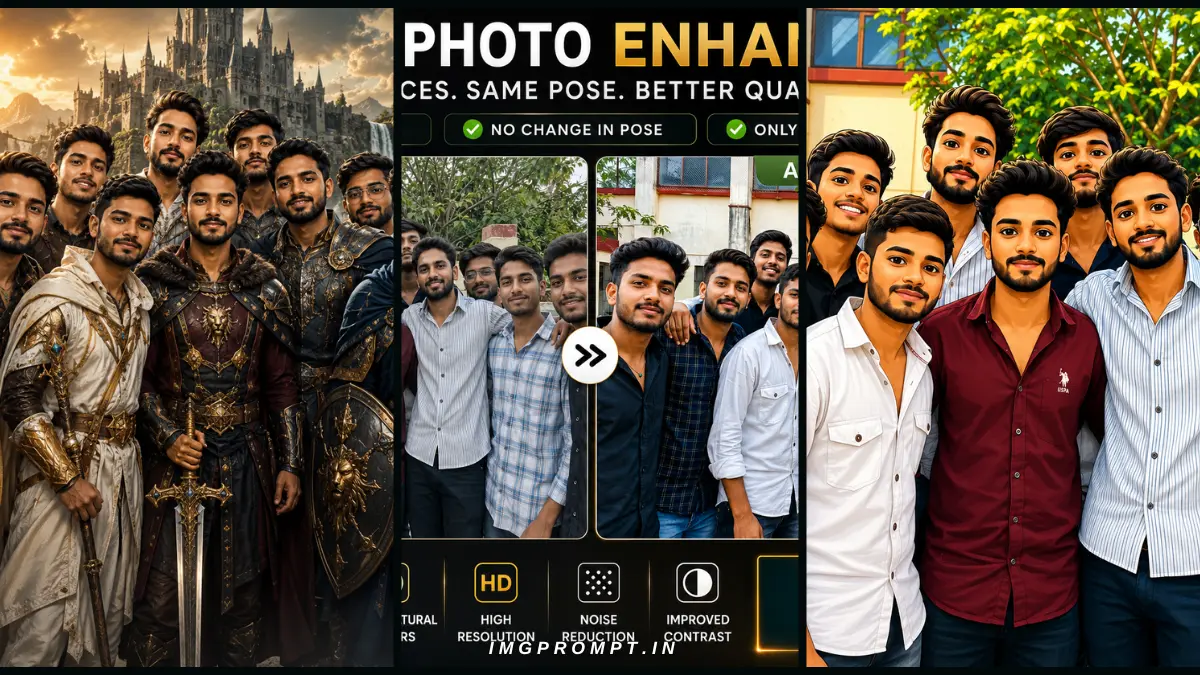
Capturing the perfect picture with multiple people is notoriously difficult. The lighting is often mismatched, someone is always blinking, the resolution drops on older smartphone cameras, or the background simply lacks energy. As someone who manages multiple digital publishing platforms and constantly works with visual content—whether it is optimizing featured images for high-traffic web portals, organizing college reunion memories, or just creating a fun, legendary team banner for my fantasy cricket league WhatsApp group—I have spent countless hours testing generative AI tools.
Table of Contents
What Is a group photo enhancer prompt?
At its core, a Group Photo AI Prompt is a structured text command written for a generative image model (such as DALL-E 3, Midjourney, or Flux). It instructs the engine on exactly how to process, edit, or stylize an uploaded picture. Unlike standard text-to-image generation where the system builds something entirely from scratch, these specific directives utilize an “image-to-image” (img2img) framework. You provide the base snapshot, and the text dictates how the algorithm should interpret and manipulate those pixels.
Understanding how a model interprets these instructions is crucial for high-quality output. When an AI scans a photograph, it tokenizes the image—breaking it down into grids of data representing colors, depth, and shapes. A poorly written command like, “Make this group photo look better,” grants the software way too much creative freedom. Because the AI does not inherently understand the emotional value of your friends or family, it might replace a friend’s face with a generic, mathematically perfect avatar.
Prompt 1: Group Photo Enhancement AI Prompt (100% Face Preservation)
Introduction
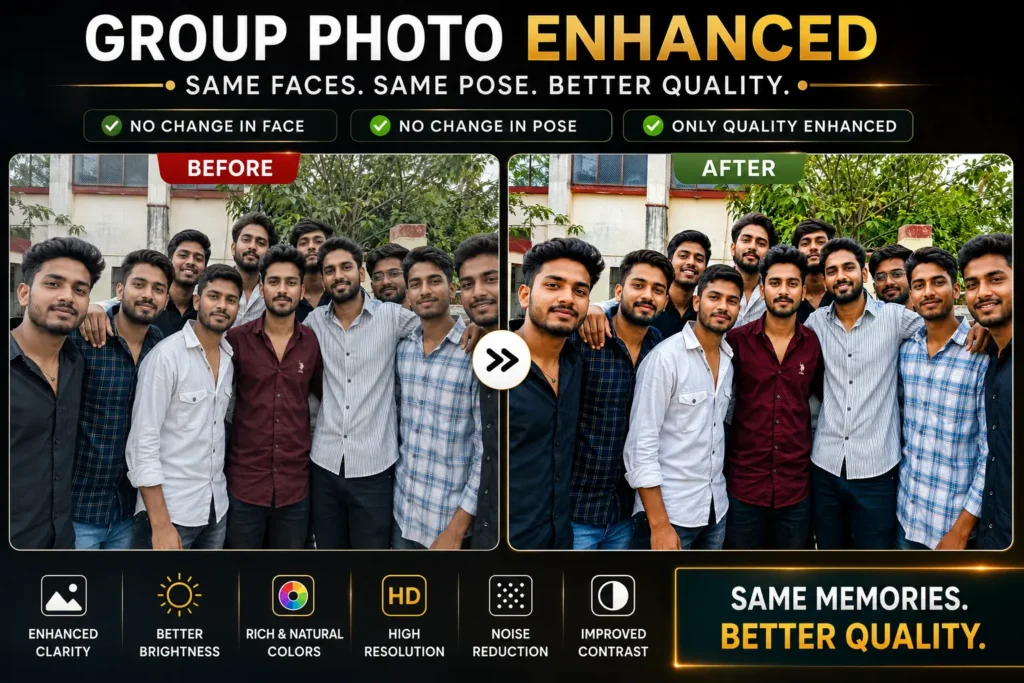
This directive serves as your ultimate digital restorer. We all possess pictures taken on older devices, in low-light indoor environments, or images that have been heavily compressed by messaging apps. This command is specifically engineered to take degraded, pixelated files and upscale them to professional, high-definition standards. It is best deployed in advanced multimodal engines like Midjourney or ChatGPT Plus that support text-guided upscaling and enhancement.
What This Prompt Does
- Resolution Upscaling: Transforms standard web-quality files into crisp, high-definition (4K/8K) formats suitable for large screens or physical printing.
- Intelligent Sharpness: Detects soft edges around eyes and facial features, clarifying them without adding harsh, artificial lines.
- Natural Color Balancing: Corrects the white point and temperature, reviving washed-out indoor scenes into vibrant, true-to-life moments.
- Aggressive Noise Reduction: Eliminates the grainy, speckled digital static (ISO noise) commonly found in night shots or smartphone zooms.
- Studio Lighting Simulation: Simulates professional studio flashes or golden-hour sun, brightening faces evenly while maintaining natural shadows.
- DSLR Depth of Field: Adds a subtle bokeh effect to gently blur the background, making the human subjects pop.
- Background Cleanup: Removes minor visual clutter without altering the location itself.
Key Features
- 100% Identity Preservation: Zero alteration to bone structure or facial geometry.
- No Face Replacement: Everyone remains exactly who they are.
- Identical Posing: Body language, height differences, and hand placements are locked in.
- Original Context: The background environment remains unchanged.
- Natural Aesthetic: Avoids the “plastic” or over-smoothed look of cheap beauty camera apps.
Best Use Cases
This prompt is ideal for reviving friends hanging out, school or college graduation memories, generational family portraits taken during holidays, corporate team pages requiring a professional touch, and massive reunion snapshots where people in the back row are slightly out of focus.
Copy & Use Prompt
ULTRA-REALISTIC GROUP PHOTO ENHANCEMENT WITH 100% IDENTITY PRESERVATION
Use the uploaded group photo as the only reference. This is strictly an enhancement task, not a recreation or re-generation task.
PRIMARY OBJECTIVE
Enhance the uploaded group photo into a premium, ultra-realistic, DSLR-quality masterpiece while preserving every person’s identity with absolute accuracy.
Every face must remain exactly the same as in the original image.
IDENTITY LOCK (HIGHEST PRIORITY)
• Preserve 100% facial identity of every individual.
• Never regenerate, redesign, or reinterpret any face.
• Keep the exact facial structure.
• Keep the same eyes, eyebrows, eyelashes, nose, lips, ears, jawline, cheeks, forehead, chin, beard, mustache, hairstyle, hairline, skin tone, skin texture, wrinkles, freckles, moles, scars, smile, expression, and every unique facial characteristic.
• Never beautify faces.
• Never make faces thinner or wider.
• Never change age.
• Never change gender.
• Never change ethnicity.
• Never perform face swap.
• Never create AI-generated faces.
• Every face should remain instantly recognizable as the original person.
GROUP PRESERVATION
Maintain:
• Exact number of people
• Exact standing positions
• Exact body posture
• Exact hand placement
• Exact expressions
• Exact eye direction
• Exact spacing between people
• Exact camera perspective
• Exact framing
• Exact crop
• Exact body proportions
Do not add or remove anyone.
CLOTHING PRESERVATION
Keep every clothing detail identical.
Do not modify:
• Shirt
• T-shirt
• Kurta
• Saree
• Shoes
• Watches
• Glasses
• Jewellery
• Accessories
• Logos
• Colors
• Fabric texture
• Fold patterns
BACKGROUND ENHANCEMENT
Do NOT replace the background.
Instead:
• Clean the background naturally
• Increase detail
• Improve color richness
• Recover natural texture
• Improve sky only if it already exists
• Restore greenery naturally
• Increase environmental depth
• Keep every object exactly where it is
Never blur the background completely.
PHOTO LOOK (Make it Premium)
Transform the image so it looks like it was captured using:
• Canon EOS R5
• Sony A7R V
• Nikon Z9
Use natural optics.
Apply:
• Professional dynamic range
• Rich natural colors
• Crisp details
• Excellent sharpness
• Soft natural lighting
• Balanced contrast
• Accurate white balance
• Premium color science
• HDR-quality realism
• High-end photography finish
LIGHTING
Improve lighting naturally.
Create:
• Soft golden natural daylight
• Balanced highlights
• Detailed shadows
• Natural skin lighting
• Slight sunlight glow
• Beautiful environmental lighting
No dramatic cinematic lighting.
DEPTH
Add only subtle natural depth.
Keep the entire group sharp.
Avoid artificial portrait blur.
Only create slight optical depth similar to a premium DSLR using a high-quality lens.
QUALITY IMPROVEMENTS
Enhance:
• Resolution
• Sharpness
• Fine textures
• Hair detail
• Clothing texture
• Eye clarity
• Skin realism
• Environmental detail
• Dynamic range
• Color accuracy
• Contrast
• Noise reduction
• Compression artifact removal
ATMOSPHERE
Without changing the scene, create a premium lifestyle photography feel by improving:
• Natural brightness
• Warm color tones
• Clean environment
• Fresh atmosphere
• Vibrant but realistic colors
• Rich greenery
• Better sky clarity (if visible)
Everything must remain believable and realistic.
STRICTLY DO NOT
❌ Change faces
❌ Change expressions
❌ Change pose
❌ Change body
❌ Change clothes
❌ Change hairstyle
❌ Change accessories
❌ Replace background
❌ Remove objects
❌ Add objects
❌ Add extra people
❌ Remove people
❌ Cartoon effect
❌ Painting style
❌ Anime style
❌ AI fantasy look
❌ Plastic skin
❌ Over HDR
❌ Oversaturation
❌ Fake bokeh
FINAL RESULT
Produce an ultra-realistic 8K premium group photograph that looks professionally captured with a flagship DSLR camera. Every person’s identity, face, pose, clothing, and background must remain exactly the same while the image becomes noticeably cleaner, sharper, richer, brighter, more detailed, and more visually impressive.
The output should immediately feel like the original photo was taken by a professional photographer with expensive camera equipment—not like an AI-generated image.
Expected Output
Users will receive a breathtakingly clear version of their original upload. Faces will appear crisp, the lighting will feel professional, and colors will pop naturally—as if a top-tier photographer reshot the exact moment using premium equipment. There will be absolutely zero loss of personal likeness, making it perfect for framing or professional publication.
Prompt 2: Convert Group Photo into Cartoon Style
Introduction
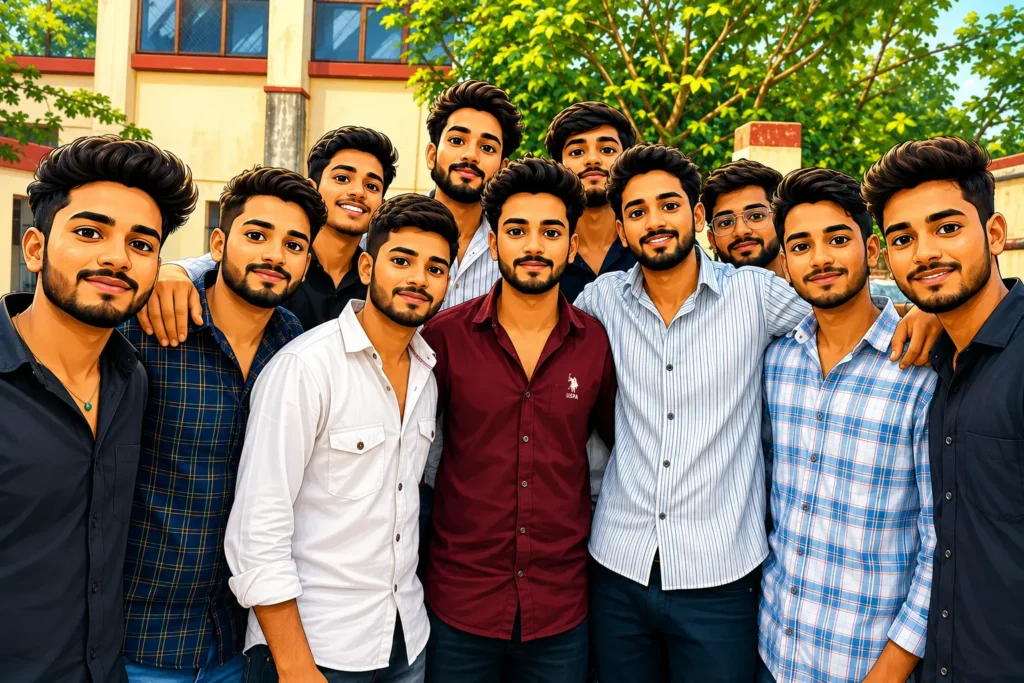
This command shifts away from strict realism and dives into the realm of creative digital art. Cartoon transformation renders a real-life snapshot through the highly stylized artistic lens of modern 3D animation studios. The biggest risk when “cartoonifying” a group is losing the essence of the subjects, making them look like generic avatars. This input is meticulously crafted to bridge that gap, applying a highly textured animated style while forcing the engine to map original facial features onto the newly generated avatars.
Features
- Pixar-Inspired Aesthetic: Emulates the highly polished, big-budget 3D rendering style of modern blockbuster animated movies.
- Volumetric 3D Textures: Replaces flat 2D elements with deep meshes for clothing fabric, realistic hair strands, and smooth skin.
- Vibrant Color Palette: Utilizes a cheerful, highly saturated color scheme that is perfect for social media feeds.
- Endearing Expressions: Translates real-world smiles and natural looks into warm, slightly exaggerated animated equivalents.
- Accurate Subject Mapping: Ensures unique characteristics—like distinct glasses, specific hairstyles, or facial hair—are integrated seamlessly into the cartoon character.
- Intact Group Composition: Ensures nobody is accidentally cropped out or merged during the complex rendering transition.
Best Uses
This style is perfect for unique WhatsApp display pictures (DPs), highly engaging Instagram posts, personalized birthday invitations, creative social media banners, and fun poster designs to hang in a shared apartment or dorm room.
Copy & Use Prompt
ULTRA-HIGH-QUALITY GROUP CARTOON TRANSFORMATION WITH 100% IDENTITY PRESERVATION
Use the uploaded group photo as the only reference.
Transform the entire group photo into a premium, ultra-detailed, high-end 3D cartoon illustration while preserving the identity of every individual. This is a stylized transformation, not a recreation.
IDENTITY PRESERVATION (HIGHEST PRIORITY)
• Preserve every person’s facial identity.
• Keep each face instantly recognizable.
• Maintain the exact facial structure.
• Preserve hairstyle, beard, mustache, eyebrows, eyes, nose, lips, ears, jawline, smile, skin tone, and unique facial characteristics.
• Keep the original age and gender.
• Never swap faces.
• Never merge faces.
• Never create new people.
GROUP PRESERVATION
• Keep the exact number of people.
• Maintain everyone’s original standing position.
• Preserve body posture.
• Preserve hand placement.
• Maintain spacing between all people.
• Keep the original camera angle and framing.
• Do not crop anyone.
CLOTHING
Keep every person’s clothing identical.
Preserve:
• Shirt
• T-shirt
• Kurta
• Saree
• Jacket
• Shoes
• Glasses
• Watches
• Jewellery
• Colors
• Patterns
• Logos
BACKGROUND
Keep the same background composition but transform it into a matching cartoon environment.
Maintain:
• Buildings
• Trees
• Road
• Sky
• Walls
• Plants
• Objects
Everything should remain recognizable while becoming beautifully illustrated.
STYLE
Transform into a premium Pixar-style 3D cartoon with:
• High-quality stylized faces
• Soft rounded features
• Large expressive eyes
• Smooth skin shading
• Beautiful lighting
• Clean outlines
• Rich colors
• Premium rendering
• Disney/Pixar-inspired quality
• Cute but realistic proportions
• Professional animated movie look
LIGHTING
Create soft cinematic daylight with:
• Warm sunlight
• Natural shadows
• Soft highlights
• Vibrant atmosphere
QUALITY
Generate:
• Ultra HD
• 8K quality
• Extremely sharp details
• Rich textures
• Smooth gradients
• High dynamic range
• Premium animation quality
STRICTLY DO NOT
❌ Change identities
❌ Remove people
❌ Add people
❌ Change clothes
❌ Change pose
❌ Change expressions drastically
❌ Change camera angle
❌ Blur faces
❌ Distort body proportions
❌ Low-quality cartoon
❌ Anime style
❌ Sketch style
❌ Watercolor style
FINAL RESULT
Create a vibrant, ultra-realistic Pixar-quality 3D cartoon version of the original group photo where every person remains instantly recognizable. The group composition, clothing, expressions, and background should stay faithful to the original while the entire image becomes a colorful, premium animated movie-style artwork with exceptional detail, lighting, and visual appeal.
Expected Result
The resulting graphic will be a visually stunning 3D animated rendering of your group. The environment transforms into a beautifully lit digital set, the clothing mimics rendered digital fabric, and the lighting carries that signature cinematic glow. Crucially, when sharing this image, every individual will immediately recognize their animated counterpart.
Prompt 3: Legendary Character Group Photo Prompt
Introduction
For those looking to step completely out of reality, this option offers an epic fantasy overhaul. It transports your everyday squad into a cinematic universe of magic, myths, and legends. Whether you want your friends to look like warriors in a dark realm, royalty in a medieval kingdom, or a high-tier competitive gaming roster, this directive seamlessly blends real-world facial structures with hyper-realistic armor and dramatic visual effects.
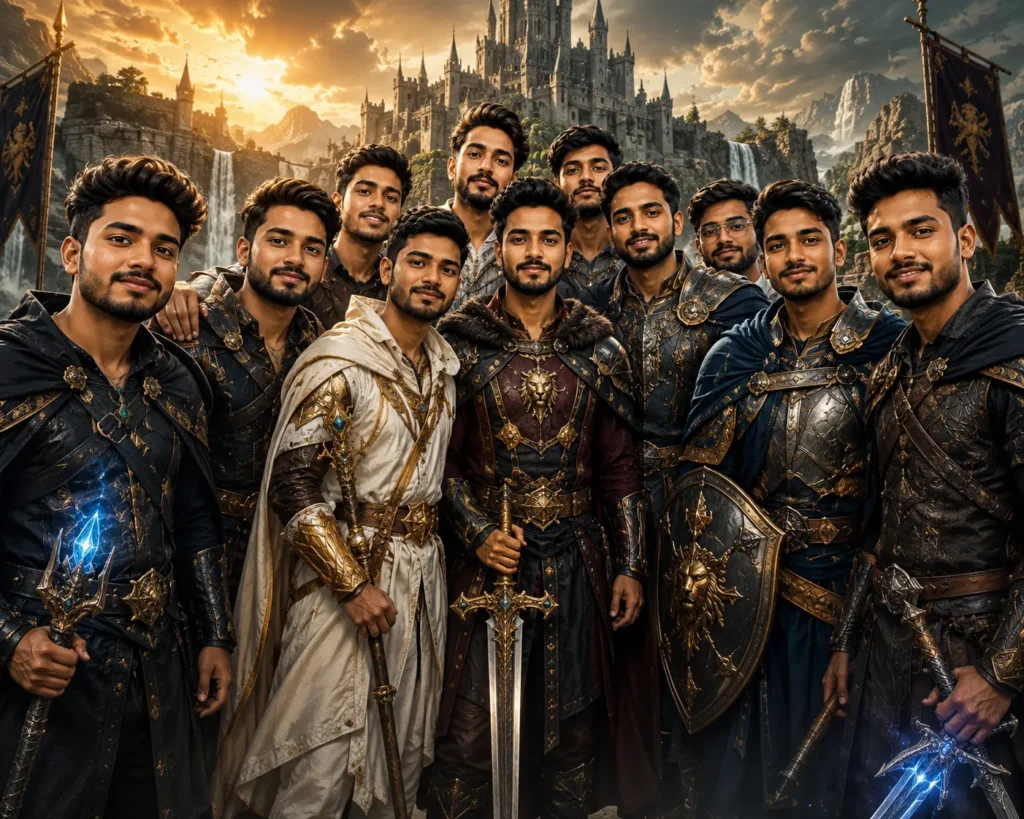
Features
- Royal & Combat Armor: Upgrades modern streetwear (jeans and t-shirts) into intricate medieval plates, leather tunics, or majestic robes.
- Powerful Accessories: Intelligently equips subjects with thematic weapons like glowing swords, magical staffs, or heavy shields based on their pose.
- Epic Fantasy Kingdoms: Completely replaces mundane living room or park settings with sweeping landscapes, misty battlefields, or ancient gothic castles.
- Cinematic Lighting Setup: Deploys moody, dramatic lighting—glowing embers, god rays piercing through clouds, and high-contrast shadows.
- AAA Game Aesthetic: Simulates the ultra-high-definition, gritty graphical fidelity of next-generation video games.
- Movie Poster Composition: Structures the layout and visual weight to resemble a multi-million dollar Hollywood blockbuster promotional piece.
Best Uses
This prompt is unmatched for gaming profiles, high-click-through-rate YouTube thumbnails, competitive team banners (especially for eSports or fantasy sports league groups), high-resolution desktop wallpapers, and eye-catching social media artwork designed to stop the scroll.
Copy & Use Prompt
Use the uploaded photo as the ONLY reference.
Transform every person in the uploaded group photo into powerful legendary fantasy heroes while preserving their real identities. The result should look like an official AAA fantasy movie poster or high-budget game cinematic.
IMPORTANT
This is a stylized transformation only.
Every person must remain instantly recognizable.
Do NOT replace faces.
Do NOT invent new identities.
IDENTITY LOCK (HIGHEST PRIORITY)
• Preserve every person’s facial identity.
• Keep the exact face shape.
• Preserve hairstyle, beard, mustache, eyebrows, eyes, nose, lips, ears, jawline, skin tone, smile, and every unique facial characteristic.
• Maintain the same age.
• Maintain the same gender.
• Never beautify or redesign faces.
• Never swap faces.
• Never merge people.
• Never create AI-generated faces.
• Every person should be immediately recognizable from the original photo.
GROUP PRESERVATION
Keep:
• Same number of people
• Same standing positions
• Same body proportions
• Same expressions
• Same camera angle
• Same framing
• Same composition
• Same spacing
Do not remove or add anyone.
LEGENDARY CHARACTER DESIGN
Transform everyone into elite legendary fantasy warriors while keeping their identities intact.
Each character should feature premium fantasy-inspired details such as:
• Elegant royal armor
• Ornate engraved shoulder guards
• Decorative chest plates
• Flowing capes
• Leather belts
• Ancient gauntlets
• Premium boots
• Heroic cloaks
• Mythic accessories
• Royal emblems
• Intricate metallic details
Every outfit should feel unique while maintaining a cohesive team appearance.
WEAPONS
Give each character a different legendary weapon, such as:
• Glowing sword
• Ancient spear
• Battle axe
• Mystic staff
• Ornate shield
• Magic bow
• Crystal blade
• Divine hammer
Weapons should look majestic without dominating the scene.
BACKGROUND
Replace the environment with an epic fantasy kingdom featuring elements like:
• Ancient castle
• Massive stone gates
• Grand mountains
• Waterfalls
• Floating ruins
• Golden sunrise
• Magical forests
• Soft glowing mist
• Dramatic clouds
• Ancient statues
• Cinematic atmosphere
LIGHTING
Create premium cinematic lighting:
• Golden rim light
• Volumetric light rays
• Soft god rays
• Natural shadows
• Warm highlights
• Epic fantasy ambiance
STYLE
Create an ultra-realistic cinematic fantasy look inspired by high-budget fantasy films and AAA role-playing games.
The image should have:
• Hyper-realistic textures
• Rich metallic reflections
• Premium fabric details
• Intricate armor engravings
• Realistic skin
• Sharp facial details
• Dramatic depth
• Rich color grading
• Professional movie-poster composition
QUALITY
Generate:
• Ultra HD
• 8K resolution
• Maximum detail
• Extremely sharp
• HDR realism
• Premium cinematic finish
STRICTLY DO NOT
❌ Change identities
❌ Replace faces
❌ Change facial expressions drastically
❌ Change body proportions
❌ Remove people
❌ Add people
❌ Cartoon style
❌ Anime style
❌ Plastic skin
❌ Low-quality fantasy art
❌ Blurry faces
❌ Distorted anatomy
FINAL RESULT
Create an epic, ultra-realistic legendary fantasy team portrait where every person looks like a powerful mythic hero while remaining instantly recognizable. The final image should resemble an official blockbuster fantasy movie poster or AAA game promotional artwork, with breathtaking cinematic lighting, luxurious armor, majestic weapons, and an unforgettable legendary atmosphere.
Expected Output
The output will be a jaw-dropping digital painting. Faces will be perfectly integrated onto the bodies of legendary warriors. Intense lighting will cast heroic shadows, and the vast atmospheric background will pull the subjects completely into a stylized cinematic universe, all while maintaining absolute true-to-life identities. It is a guaranteed conversation starter.
Which AI Models Work Best?
Not all artificial intelligence engines process image-to-image commands equally. When dealing with multiple subjects and the strict requirement of facial fidelity, some platforms vastly outperform others due to their underlying architecture.
| AI Tool | Enhancement | Cartoon Style | Legendary Fantasy |
|---|---|---|---|
| Midjourney (v6) | ⭐⭐⭐⭐⭐ | ⭐⭐⭐⭐⭐ | ⭐⭐⭐⭐⭐ |
| ChatGPT Images (DALL-E 3) | ⭐⭐⭐⭐☆ | ⭐⭐⭐⭐⭐ | ⭐⭐⭐⭐☆ |
| Gemini (Imagen 3) | ⭐⭐⭐⭐☆ | ⭐⭐⭐⭐☆ | ⭐⭐⭐⭐☆ |
| Grok | ⭐⭐⭐☆☆ | ⭐⭐⭐⭐☆ | ⭐⭐⭐☆☆ |
| Flux (Pro/Dev) | ⭐⭐⭐⭐☆ | ⭐⭐⭐⭐☆ | ⭐⭐⭐⭐⭐ |
Expert Breakdown: Midjourney currently reigns supreme for raw detail and photorealism, especially when utilizing parameters like --cref (character reference) or --iw (image weight) to lock in faces. However, ChatGPT (DALL-E 3) remains incredibly user-friendly for beginners and adheres to long, complex text guidelines with excellent precision, making it the best choice for the cartoon prompt. Flux is rapidly becoming a favorite for developers and power users seeking ultimate control over cinematic lighting.
Tips to Get Better Results
Generative AI is only as good as the input data it receives. To ensure your outputs are flawless on the very first try, follow these professional workflows:
- Upload the Highest-Resolution File: Always use the original source file straight from the camera roll. Images compressed by social media apps lose crucial pixel data, making it harder for the AI to preserve fine facial geometry.
- Ensure Subject Visibility: The system needs a clear line of sight to a face. If someone is obscured by deep shadows, looking away, or hidden behind another person, the software will struggle to render them accurately.
- Avoid Extreme Motion Blur: Heavy blur forces the generator to “guess” features. If the AI guesses, it replaces the identity. Start with a relatively focused base image.
- Keep the Full Instruction Set: Do not delete the sentences regarding “STRICT RULE.” These guardrails are essential algorithmic constraints.
- Iterate and Regenerate: Generative technology relies on diffusion, which has a random seed element. If the first attempt has a minor flaw (like a weird hand or mismatched eye), simply hit the regenerate button. The second or third output is often completely flawless.
Common Mistakes to Avoid
Even with a master prompt, human error during the upload process can ruin the final image. Avoid these common pitfalls:
- Cropped Uploads: Providing a file where people at the edges are half-cut causes the software to panic. It will generate unnatural, distorted limbs or floating heads to “fill in the blanks” of the canvas.
- Removing Identity Locks: Shortening the text to save time inevitably results in generic, computer-generated replacements. Do not sacrifice the prompt’s integrity for brevity.
- Mixing Stylistic Commands: Combining conflicting aesthetics in a single generation (e.g., “Make it a 3D animated cartoon but also hyper-realistic DSLR and dark fantasy”) confuses the processor. Stick to one clear vision per generation.
- Low-Quality Source Scanning: Taking a picture of a physical printed photograph with your phone (especially with screen glare or reflections) feeds the engine garbage data, leading to muddy, unusable outputs. Scan physical photos properly first.
Frequently Asked Questions (FAQs)
1. Can these AI prompts enhance old, scanned collective pictures?
Yes, absolutely. By using Prompt 1 (Enhancement), the system can significantly improve old, digitized uploads. It excels at removing film grain, sharpening soft edges, and restoring natural colors that may have faded over decades.
2. Will everyone’s face remain 100% accurate and unchanged?
If you use the exact text provided in this guide—which includes strict negative guardrails—the software will heavily prioritize keeping everyone recognizable. However, utilizing high-quality source files with clear lighting is required for the absolute best outcomes.
3. Which AI platform yields the highest quality for these specific prompts?
For overall realism, cinematic textures, and advanced user control, Midjourney is the industry leader. For ease of use, conversational editing, and strong guideline adherence, DALL-E 3 (via ChatGPT Plus) is highly recommended for everyday users.
4. Can I create an animated 3D cartoon version from any snapshot?
Yes, the Cartoon Transformation command works on almost any well-lit file. It performs exceptionally well on images with clear, natural expressions and standard lighting.
5. Can I use these directives for family portraits?
Definitely. These prompts are versatile. The enhancement prompt is perfect for preserving generational family portraits, while the cartoon prompt makes for excellent, personalized family holiday greeting cards.
6. Are these text prompts free to use?
The text commands themselves are 100% free for you to copy, paste, and modify. However, the AI platforms you execute them on (like Midjourney or ChatGPT Plus) may require a paid subscription. You can often find free daily credits on platforms like Microsoft Copilot (Designer) or Google Gemini.
7. Do these AI tools work on mobile devices?
Yes. You can paste these exact strings into the official mobile applications of any major generator (ChatGPT app, Copilot app, or Discord for Midjourney) directly from your iOS or Android smartphone.
8. Can I generate true 4K or 8K resolution files?
The text explicitly requests 8K resolution to force the engine’s internal style to prioritize high-fidelity details. While most platforms natively output smaller dimensions (like 1024×1024), requesting 8K ensures maximum available sharpness. You can then run that output through a dedicated, free AI upscaler tool to achieve actual 4K or 8K print resolution.
Final Thoughts
The ability to manipulate, restore, and creatively upgrade our digital memories is a massive advantage for web publishers, content creators, and friend groups alike. By deploying the correct text commands, you bypass the common frustrations of generative technology—namely, the loss of human identity—and consistently produce professional-grade artwork.
To summarize your toolkit:
- The Enhancement Option rescues old, compressed, or low-quality files, turning them into printable memories.
- The Cartoon Directive is ideal for highly shareable, Pixar-esque social media graphics that drive engagement.
- The Legendary Command creates epic, high-octane fantasy artwork perfect for gaming hubs, YouTube, or competitive banners.
Stop settling for uninspired, blurry visuals. Choose the aesthetic that matches your project’s goal, copy the text, and let the technology transform your team’s memories into masterpieces while preserving the faces you care about most.
Related Articles