
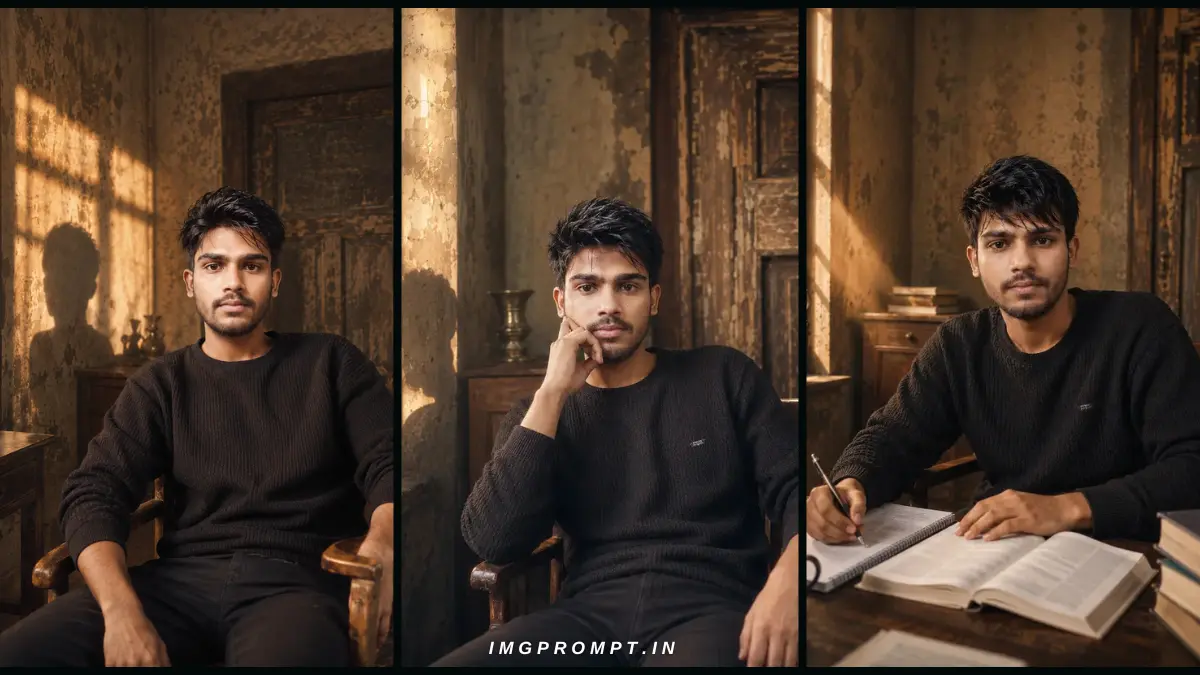
Best Social Media DP AI Prompt with Identity Lock : – Your profile picture is often the first thing people notice on social media. Whether you use Instagram, Facebook, WhatsApp, LinkedIn, X (Twitter), YouTube, or Telegram, a clean and professional display picture (DP) helps create a better first impression. Today, AI image generators make it possible to create stunning profile photos in just a few seconds, but there is one common problem—most AI tools change your face so much that the final image no longer looks like you.
To solve this problem, we created a collection of professional Social Media DP AI Prompts that focus on realistic face preservation instead of creating a completely different person. These prompts are specially written for users who want cinematic, high-quality portraits while keeping their natural identity as close as possible to the original photo.
Unlike ordinary prompts that only describe a background or lighting, every prompt in this collection follows a structured approach. It combines an advanced Identity Lock, realistic camera instructions, natural lighting, professional poses, and cinematic environments to produce images that look like they were captured by an experienced photographer instead of being generated by AI.
During testing, we created multiple portrait styles using these prompts. Each one gives a different look while following the same goal—create a premium profile picture without losing the original facial identity.
Table of Contents
What You’ll Find in This Prompt Collection
This is not a single AI prompt. It is a complete collection of carefully designed prompts for creating different types of social media display pictures. Every prompt is written for a specific pose, environment, and photography style.
Included Prompt Collection
- Professional Sitting Portrait Prompt
- Study Desk Portrait Prompt
- Vintage Room Portrait Prompt
- Hand on Cheek Portrait Prompt
- Window Light Cinematic Portrait Prompt
- Golden Hour Editorial Portrait Prompt
- Relaxed Chair Sitting Prompt
- Moody Indoor Portrait Prompt
- Professional Social Media DP Prompt
- Identity Lock Prompt for Face Preservation
Each prompt creates a different style, but all of them follow the same photography principles—natural lighting, realistic body proportions, professional camera composition, and cinematic color grading.
Why These Best Social Media DP AI Prompt with Identity Lock Are Different
Many AI portrait prompts available online are very short. They usually contain only a few words like “professional portrait” or “cinematic photo.” Because of the lack of detail, the AI has to guess everything on its own. As a result, the hairstyle changes, the beard becomes different, the jawline looks sharper, or the entire face appears to belong to another person.
The prompts shared in this guide are much more detailed. Instead of leaving important decisions to the AI, they clearly explain how the portrait should be generated. Every important element—from facial identity to lighting—is described carefully to achieve a more realistic result.
| Normal AI Prompt | Our DP AI Prompt |
|---|---|
| Short description only | Complete professional instructions |
| Random face changes | Identity Lock priority |
| Basic background | Cinematic environments |
| Unknown camera angle | Professional lens & composition |
| Average lighting | Golden hour editorial lighting |
| Generic portrait | Professional social media DP |
Perfect for Every Social Media Platform
The generated portraits are suitable for almost every platform where a high-quality profile picture is important.
- Instagram Profile Picture
- Facebook DP
- WhatsApp Profile Photo
- LinkedIn Professional Portrait
- YouTube Channel Profile
- X (Twitter) Profile Image
- Telegram Profile Photo
- Discord Avatar
- Personal Portfolio
- Blog Author Profile
Because these prompts use realistic photography techniques, the final image feels natural and premium instead of looking heavily AI-generated.
Main Features of This Prompt Collection
Every prompt included in this guide is designed to improve portrait quality while keeping the overall appearance realistic.
- Advanced Identity Lock
- Realistic Face Preservation
- Natural Hairstyle Instructions
- Professional Sitting & Study Poses
- Golden Hour Lighting
- Vintage Interior Backgrounds
- Editorial Photography Style
- Professional Camera Settings
- Natural Skin Texture
- Realistic Hair Details
- Shallow Depth of Field
- Premium Color Grading
- 8K Ultra HD Quality
- Negative Prompt for Better Results
Who Should Use These Prompts?
This collection is ideal for anyone who wants a professional-looking social media profile picture without booking an expensive photoshoot.
- Students
- Content Creators
- YouTubers
- Bloggers
- Freelancers
- LinkedIn Professionals
- Digital Marketers
- AI Art Enthusiasts
- Personal Branding Creators
- Anyone who wants realistic AI portraits
Professional Sitting Pose AI Prompt
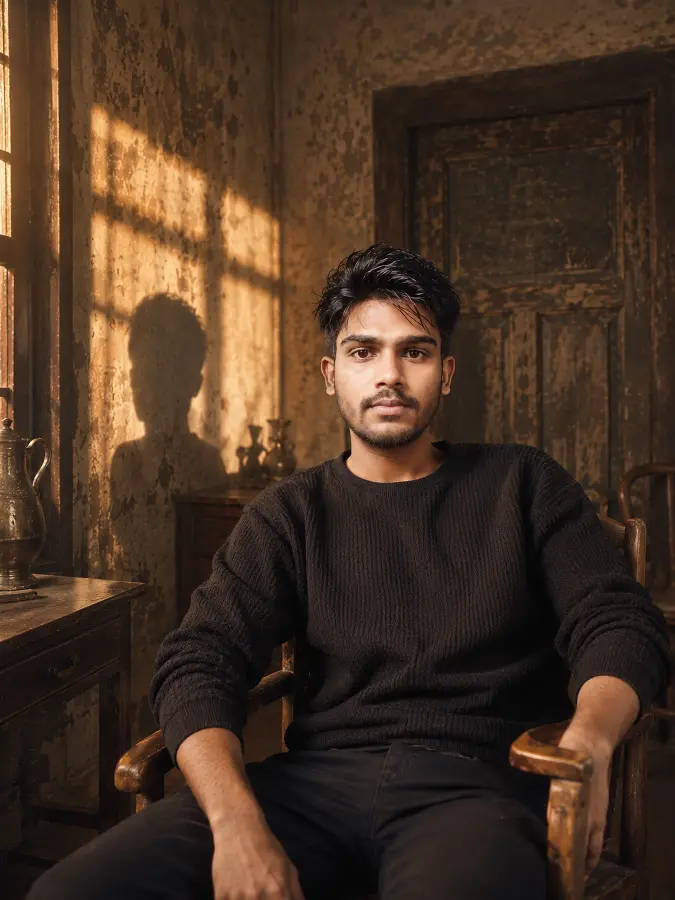
Preserve the exact facial identity from the reference image with maximum accuracy. Maintain the same face shape, jawline, forehead, eyes, eyebrows, nose, lips, ears, skin tone, age, beard density, facial proportions, and natural expression. Keep the identity completely unchanged. Only improve the hairstyle into a naturally well-groomed, stylish, modern textured hairstyle with realistic hair strands while keeping the original hairline and facial identity intact.
The subject is naturally seated on an old vintage wooden chair inside a timeless rustic room with peeling plaster walls, aged wooden doors, antique furniture, and authentic cinematic details. The pose is relaxed and confident with one hand resting naturally on the chair or thigh, shoulders slightly angled instead of facing perfectly straight, creating a premium editorial portrait. The camera is positioned several feet away, making it look like a professional photograph instead of a selfie.
Golden hour sunlight streams through a nearby window, producing beautiful volumetric rays, dramatic shadows, and a large realistic silhouette beside the subject. Warm cinematic lighting wraps naturally around the face with subtle rim light, soft haze, gentle light bloom, muted shadows, realistic ambient bounce light, and premium vintage color grading.
Photographed with an 85mm full-frame portrait lens from approximately 2–3 meters away, eye-level composition, waist-up portrait, shallow depth of field, natural perspective compression, subject perfectly separated from the background.
Ultra-photorealistic editorial photography, realistic skin pores, natural fabric texture, high dynamic range, subtle film grain, premium magazine-quality portrait, authentic cinematic atmosphere, 8K quality.
Negative Prompt:
selfie, phone camera, arm visible, hand holding camera, front camera, mirror selfie, distorted face, identity change, AI face, over-smoothed skin, plastic skin, exaggerated muscles, cartoon, anime, CGI, oversaturated colors, low quality, blur, watermark, text, logo, extra fingers, deformed hands, duplicate body parts, unrealistic lighting, wide-angle distortion.
Hand on Cheek Cinematic Portrait AI Prompt
[ABSOLUTE IDENTITY LOCK – HIGHEST PRIORITY]
The uploaded reference image is the only source of identity.
The final image must look like the exact same real person photographed in a different environment.
Do NOT recreate a different face.
Do NOT beautify, idealize, stylize, or reinterpret the facial features.
Preserve with maximum accuracy:
• exact face shape
• forehead
• jawline
• cheekbones
• chin
• eyes and eye spacing
• eyebrows
• nose
• lips
• ears
• beard density and beard pattern
• skin tone
• natural facial asymmetry
• age
• neck thickness
• shoulder width
• body build
Maintain the exact same identity while only styling the hair naturally. Keep the original hairline unchanged. Create a clean, slightly textured hairstyle with realistic individual hair strands, soft natural volume, and subtle movement. Do not change forehead size or facial proportions.
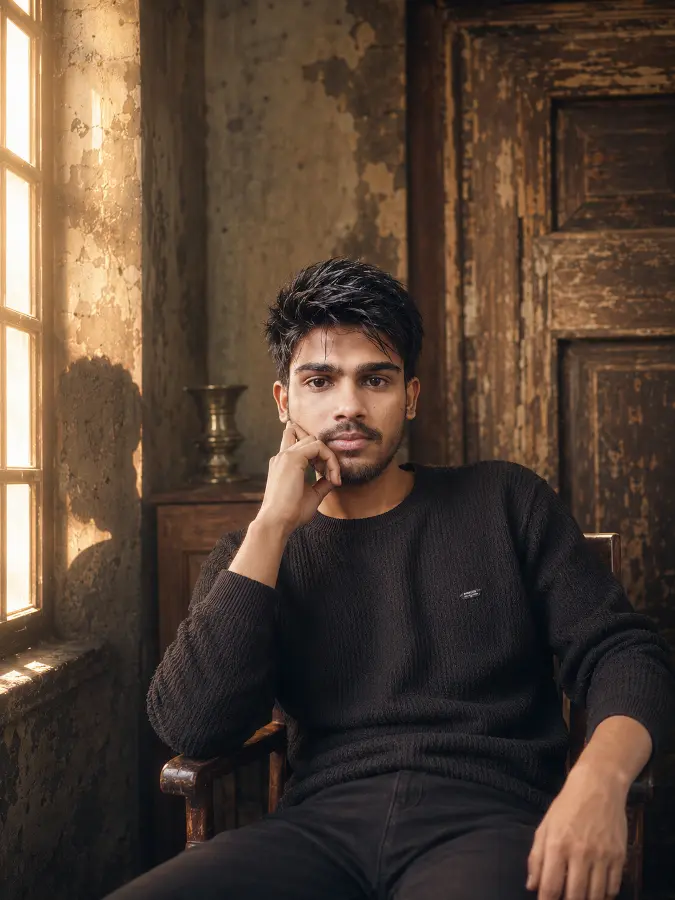
The subject is seated comfortably on an antique wooden chair inside an old heritage room with weathered plaster walls, vintage wooden doors, rustic furniture, faded textures, and timeless architectural details.
Pose:
The body is turned approximately 30–40 degrees away from the camera while the face gently turns toward the lens. One elbow rests naturally on the chair’s armrest. The same hand supports the cheek lightly with fingertips resting against the jawline, creating a thoughtful and relaxed expression. The opposite hand rests casually on the thigh. The shoulders remain relaxed, posture straight yet effortless, legs positioned naturally. The pose should feel candid, elegant, and completely natural as if captured during a quiet moment rather than intentionally posing.
Expression:
Calm, confident, thoughtful, soft neutral expression with relaxed eyes and naturally closed lips.
Lighting:
Warm golden-hour sunlight enters through a large vintage window, producing beautiful volumetric light rays, soft rim lighting, dramatic long shadows, realistic ambient bounce light, subtle haze, light bloom, and a large natural shadow silhouette on the aged wall. Premium cinematic color grading with warm highlights and muted shadows.
Camera:
Captured by a professional photographer from approximately 3–4 meters away using a 135mm full-frame portrait lens at eye level. Medium portrait framing from the waist upward. Natural perspective compression, shallow depth of field, creamy background bokeh, perfectly balanced editorial composition. Absolutely no selfie appearance.
Style:
Ultra-photorealistic editorial photography, authentic skin pores, realistic fabric texture, HDR lighting, subtle Kodak Portra 400 film grain, premium luxury magazine portrait, cinematic atmosphere, realistic color science, 8K quality.
Negative Prompt:
different person, face swap, identity drift, AI face, beautified face, handsome filter, beauty filter, plastic skin, over-smooth skin, altered facial proportions, different beard, different hairstyle shape, slim face, wide jaw, different nose, different eyes, selfie, phone camera, front camera, mirror selfie, arm extended, wide-angle lens, cartoon, anime, CGI, watermark, logo, text, blur, low quality, extra fingers, deformed hands, unrealistic lighting.
Study Desk AI Portrait Prompt
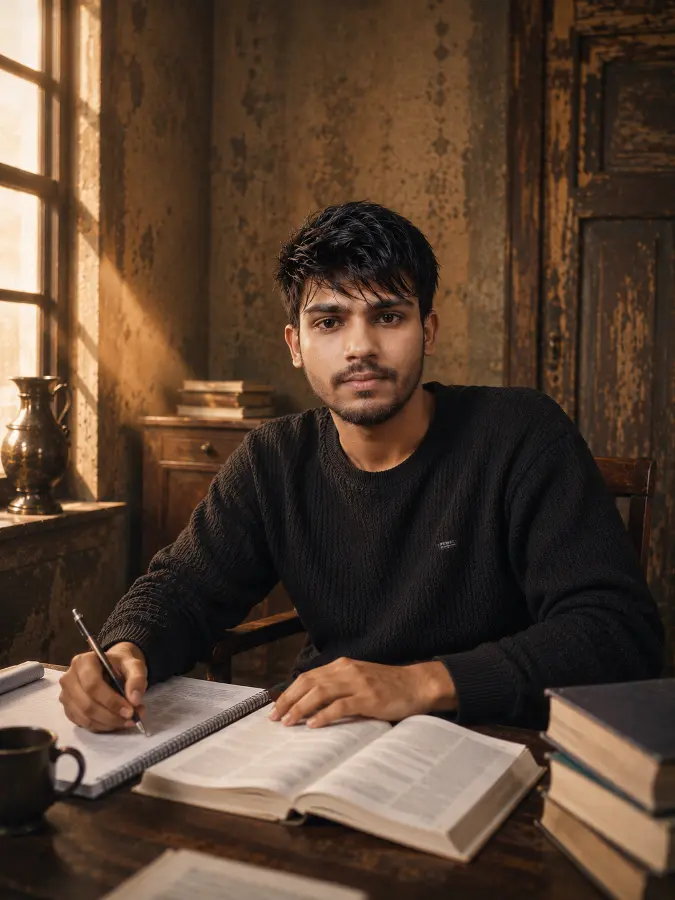
[ABSOLUTE REFERENCE IDENTITY LOCK – HIGHEST PRIORITY]
The uploaded reference image is the ONLY source of identity.
This is NOT a request to create a new person.
The output MUST depict the exact same real individual photographed in a different situation.
Do NOT redesign, beautify, idealize, stylize, reinterpret, or replace any facial features.
Identity preservation has the highest priority and overrides all artistic instructions.
Preserve exactly:
• face shape
• forehead height
• hairline
• hairstyle direction
• eye shape and spacing
• eyebrows
• nose shape
• lips
• ears
• beard style, density and growth pattern
• jawline
• cheekbones
• chin
• skin tone
• skin texture
• facial asymmetry
• age
• neck thickness
• shoulder width
• body proportions
Do NOT change:
• facial proportions
• forehead size
• eye size
• nose width
• lip thickness
• jaw width
• chin length
• beard pattern
• body type
• skin complexion
The subject must remain exactly the same person from the reference photograph.
Only refine the hair slightly while keeping the original hairline and overall hairstyle unchanged.
————————————————–
SCENE
The subject is sitting at a vintage wooden study desk inside an old heritage room with peeling plaster walls, aged wooden doors, rustic furniture, vintage books, notebooks, loose papers and a ceramic coffee mug.
The subject is writing naturally in an open notebook using a pen while another book remains open beside it.
The body is leaning slightly forward in a relaxed study posture.
One forearm rests naturally on the desk while writing.
The opposite hand rests gently on the open book.
The subject briefly looks toward the camera as if interrupted during studying.
Natural relaxed shoulders.
No posing.
No selfie feeling.
————————————————–
LIGHTING
Warm golden-hour sunlight enters through a large vintage window from the left.
Beautiful volumetric sun rays.
Soft cinematic haze.
Natural rim light.
Warm highlights.
Realistic ambient bounce light.
Subtle shadow falloff.
Kodak Portra color science.
Premium editorial cinematic grading.
————————————————–
CAMERA
Captured by a professional photographer.
Camera placed approximately 3.5 meters away.
135mm full-frame portrait lens.
Eye-level camera angle.
Medium shot.
Natural perspective compression.
Extremely shallow depth of field.
Creamy background bokeh.
Magazine editorial composition.
Professional documentary photography.
————————————————–
QUALITY
Ultra photorealistic.
Natural skin pores.
Realistic hair strands.
Realistic fabric texture.
High Dynamic Range.
8K.
Editorial photography.
Professional color grading.
No AI appearance.
————————————————–
NEGATIVE PROMPT
different person,
identity drift,
face swap,
AI face,
beautified face,
handsome filter,
beauty filter,
plastic skin,
perfect symmetry,
changed hairstyle,
different hairline,
different beard,
different eyes,
different nose,
different lips,
different jaw,
different skin tone,
different body,
muscular body,
thin body,
CGI,
cartoon,
anime,
painting,
illustration,
selfie,
phone camera,
front camera,
mirror selfie,
wide angle,
24mm,
35mm,
arm extended,
watermark,
logo,
text,
low quality,
blur,
extra fingers,
deformed hands,
unrealistic lighting
Best AI Models for These Social Media DP Prompts
One of the biggest questions users ask is, “Which AI image generator gives the best results?” The answer depends on what you want to achieve. Some AI models create beautiful lighting, while others are better at following detailed prompts. If your goal is to generate a realistic social media display picture with natural lighting and good facial consistency, choosing the right AI model is just as important as writing a good prompt.
The prompts shared in this guide are written in a universal format, which means they can be used on multiple AI image generators with only small adjustments if needed.
| AI Model | Best For | Recommendation |
|---|---|---|
| ChatGPT Images (GPT Image) | Natural portraits & cinematic lighting | ⭐⭐⭐⭐⭐ |
| Flux Kontext | Detailed prompt understanding | ⭐⭐⭐⭐⭐ |
| Midjourney | Creative editorial portraits | ⭐⭐⭐⭐☆ |
| Google Gemini | Fast image generation | ⭐⭐⭐⭐☆ |
| Leonardo AI | Photorealistic portraits | ⭐⭐⭐⭐☆ |
| Stable Diffusion XL | Advanced customization | ⭐⭐⭐⭐☆ |
| Ideogram | Balanced quality | ⭐⭐⭐⭐☆ |
| Recraft | High-quality realistic images | ⭐⭐⭐⭐☆ |
Even though these AI models support detailed prompts, the final result may vary because every model has its own way of interpreting instructions. You may need to generate more than one image to get your favorite result.
Inside Every Prompt
Every prompt in this collection follows the same professional structure. This makes it easier to switch between different poses without rewriting everything from the beginning.
- Identity Lock
- Face Preservation Instructions
- Hairstyle Guidelines
- Body Position
- Hand Placement
- Camera Distance
- Lens Information
- Lighting Setup
- Background Description
- Photography Style
- Quality Instructions
- Negative Prompt
Because each section has a specific purpose, the AI receives much clearer instructions compared to a short one-line prompt.
Understanding Identity Lock
Identity Lock is the most important section of every prompt in this guide. Its purpose is simple—it tells the AI to use the uploaded image as the main reference for the person’s appearance.
Without Identity Lock, many AI generators automatically make creative changes. The face may become younger, the beard may change, the hairstyle may look completely different, or the body may appear slimmer than the original photo.
A strong Identity Lock helps reduce these unwanted changes by asking the AI to preserve important facial features as closely as possible.
Identity Lock Usually Protects:
- Face Shape
- Jawline
- Eyes
- Eyebrows
- Nose Shape
- Lips
- Skin Tone
- Hairline
- Beard Style
- Natural Expression
- Body Build
- Shoulder Width
While no AI model can promise a perfect one-to-one copy of a real face, adding detailed identity instructions generally leads to more consistent portraits than using a simple prompt.
Portrait Styles Included in This Collection
Instead of using the same pose every time, you can choose different portrait styles depending on where you want to use the image.
| Prompt | Best Use |
|---|---|
| Professional Sitting Portrait | LinkedIn & Professional Profile |
| Study Desk Portrait | Students & Educational Profiles |
| Vintage Room Portrait | Cinematic Social Media DP |
| Hand on Cheek Portrait | Instagram & Personal Branding |
| Golden Hour Portrait | Facebook & WhatsApp DP |
| Window Light Portrait | Editorial Photography Style |
Why Camera Instructions Matter
Most people focus only on the background, but camera instructions also have a huge impact on the final portrait.
For example, a wide-angle lens may stretch the face slightly, while a portrait lens creates a more natural perspective. That’s why our prompts usually mention professional portrait lenses and realistic camera distances. These details help the image look more like a real photograph.
- Eye-level camera angle for a natural look.
- Portrait lens for balanced facial proportions.
- Soft background blur to highlight the subject.
- Natural framing suitable for social media profile pictures.
Lighting Makes the Biggest Difference
Lighting is one of the easiest ways to change the mood of a portrait. Warm golden-hour light creates a soft and premium look, while harsh lighting can make the image feel less natural.
Most prompts in this collection use warm sunlight entering through a window, soft shadows, gentle highlights, and subtle cinematic color grading. This combination produces portraits that feel calm, realistic, and visually appealing.
Before You Generate Your First Portrait
Before copying any prompt, make sure your reference photo is clear and high quality. A front-facing image with good lighting usually gives better results than a blurry or heavily filtered photo. The better the reference image, the easier it is for the AI to understand your facial features.
In the next part of this guide, we’ll explore different pose ideas, background styles, clothing options, camera angles, and practical tips to help you create even more realistic social media profile pictures.
Different Portrait Pose Ideas
One of the biggest advantages of these prompts is that you can keep the same facial identity while changing the pose. A small change in body posture or hand placement can completely change the mood of the portrait without making it look unnatural.
Below are some of the best pose ideas that work well for realistic social media profile pictures.
| Pose | Best For |
|---|---|
| Study Desk Pose | Students & Educational Profiles |
| Professional Sitting Pose | LinkedIn & Portfolio |
| Hand on Cheek | Instagram & Personal Branding |
| Looking Outside Window | Cinematic Portrait |
| Writing in Notebook | Study Theme |
| Reading a Book | Educational Content |
| Leaning on Desk | Relaxed Editorial Portrait |
| Crossed Arms Sitting | Professional Look |
| Looking at Camera | Classic DP |
| Side Profile Portrait | Creative Photography |
Best Background Ideas
A beautiful background helps create a premium portrait, but it should never distract from the subject. The prompts in this guide are designed to keep the background realistic and balanced.
- Vintage Study Room
- Wooden Library
- Modern Workspace
- Minimal Office
- Coffee Shop
- Classic Reading Room
- Old Heritage Building
- Large Window with Golden Sunlight
- Bookshelf Background
- Luxury Home Office
- Rustic Indoor Studio
- Minimal Dark Room
These backgrounds work well for Instagram, LinkedIn, YouTube, blogs, and other personal branding platforms.
Clothing Ideas
Your outfit also affects the overall style of the portrait. Simple clothing usually produces more realistic results than highly detailed fashion outfits.
| Outfit | Recommended Use |
|---|---|
| Black Sweater | Professional DP |
| White Shirt | LinkedIn Profile |
| Formal Blazer | Business Portrait |
| Casual Hoodie | Instagram Profile |
| Denim Jacket | Lifestyle Portrait |
| Traditional Kurta | Festival Portrait |
| Turtleneck Sweater | Luxury Editorial Style |
Camera Angle Ideas
Changing the camera angle can create a completely different feeling even when the pose remains the same.
- Eye-Level Portrait
- Front Portrait
- 45 Degree Portrait
- Close-Up Portrait
- Half Body Portrait
- Waist-Up Portrait
- Full Body Portrait
- Wide Editorial Shot
- Side Portrait
- Over-the-Desk Shot
Eye-level portraits usually look the most natural for profile pictures because they closely match real-life photography.
Lighting Styles You Can Try
Lighting changes the mood of the portrait more than any other setting. Here are some popular lighting styles you can use with the same prompt.
- Golden Hour Window Light
- Soft Morning Light
- Warm Indoor Lighting
- Moody Cinematic Lighting
- Natural Daylight
- Studio Softbox Lighting
- Sunset Orange Glow
- Blue Hour Lighting
- Rainy Window Light
- Luxury Editorial Lighting
Tips for Better Results
Even the best prompt cannot fix a poor reference image. The quality of your uploaded photo plays a major role in the final output.
- Upload the highest quality photo available.
- Use a front-facing image whenever possible.
- Keep your full face visible.
- Avoid heavy beauty filters.
- Do not crop the forehead or chin.
- Natural lighting works better than dark selfies.
- Use only one person in the reference image.
- Avoid sunglasses or face masks.
- Keep facial expression relaxed.
- Generate multiple variations before choosing the best one.
Common Mistakes to Avoid
Many users blame the AI model when the real problem is the reference photo or prompt. Avoiding these common mistakes can improve your results.
| Mistake | Better Choice |
|---|---|
| Blurred Selfie | Sharp Front Photo |
| Multiple People | Single Person Image |
| Heavy Beauty Filter | Natural Face |
| Dark Lighting | Bright Natural Lighting |
| Side Face Only | Front or Slight Angle |
| Low Resolution | High Resolution Photo |
| Cropped Face | Complete Face Visible |
Quick Pro Tips
- Keep the same Identity Lock section in every prompt.
- Change only the pose, background, or clothing when creating new portraits.
- Avoid changing too many prompt sections at the same time.
- Generate at least 3–5 versions before selecting the final image.
- Upscale your favorite image for the best quality before using it as your profile picture.
Now that you’ve explored different poses, backgrounds, clothing ideas, and camera styles, you’re ready to start creating realistic AI portraits. In the final part of this guide, we’ll answer common questions, provide prompt download options, share related prompts, and discuss important usage tips to help you get the most out of this collection.
Frequently Asked Questions (FAQs)
1. Are these AI prompts free to use?
Yes. All prompts shared in this collection can be copied and used for personal projects. Simply copy the prompt, upload your reference photo, and generate your portrait using your preferred AI image generator.
2. Which AI model gives the best results?
These prompts work with multiple AI image generators including ChatGPT Images (GPT Image), Flux Kontext, Midjourney, Gemini, Leonardo AI, Stable Diffusion XL, Ideogram, and Recraft. Results may vary depending on the model, prompt interpretation, and your uploaded reference photo.
3. Can I use my own photo?
Absolutely. These prompts are designed to work with your own reference image. For the best results, use a clear front-facing photo with natural lighting.
4. Will my face remain exactly the same?
The prompts include detailed Identity Lock instructions to improve facial consistency. However, AI image generators cannot guarantee an exact one-to-one copy of a real face. Results may vary slightly between models.
5. Can I change the background?
Yes. You can easily replace the background description with a library, office, coffee shop, modern workspace, luxury room, outdoor park, or any other environment while keeping the same Identity Lock section.
6. Can I change the outfit?
Yes. Clothing can be customized according to your preference, such as a formal suit, hoodie, casual shirt, blazer, kurta, sweater, or traditional outfit.
7. Are these prompts suitable for social media profile pictures?
Yes. These prompts are specially written for creating high-quality profile pictures for Instagram, Facebook, WhatsApp, LinkedIn, X (Twitter), YouTube, Telegram, Discord, and other platforms.
8. What type of reference image should I upload?
Choose a sharp, high-resolution photo where your face is clearly visible. Avoid heavy filters, sunglasses, low-light selfies, or group photos for better results.
9. Can beginners use these prompts?
Yes. Simply copy the prompt, upload your image, and generate the portrait. No advanced editing knowledge is required.
10. Can I edit the generated image later?
Yes. Most AI image generators allow you to regenerate, edit, or customize the output by changing the prompt or adding new instructions.
Prompt Download
For convenience, you can save these prompts in different formats and use them later.
- TXT Prompt File
- HTML Version
- PDF Version
- JSON Format
- Markdown Version
Tip: Save the Identity Lock section separately so you can reuse it with different portrait styles.
Prompt Versions
| Version | Updates |
|---|---|
| Version 1.0 | Initial Social Media DP Prompt Collection. |
| Version 1.1 | Improved Identity Lock instructions. |
| Version 1.2 | Added cinematic lighting and professional camera settings. |
| Version 1.3 | Added Study Pose and Vintage Room prompts. |
| Version 1.4 | Added Hand-on-Cheek and Window Portrait prompts. |
| Latest Version | Optimized for modern AI image generators with improved prompt structure. |
Related AI Prompts
If you enjoyed these portrait prompts, you may also like the following collections.
- Professional LinkedIn Portrait AI Prompt
- Instagram Profile Picture AI Prompt
- WhatsApp DP AI Prompt
- Office Workspace Portrait Prompt
- Library Study Portrait Prompt
- Luxury Indoor Portrait Prompt
- Coffee Shop Portrait Prompt
- Moody Window Light Portrait Prompt
- Golden Hour Cinematic Portrait Prompt
- Professional Sitting Pose Prompt
Copyright & Usage
The prompts provided in this article are intended for learning, experimentation, and creating your own AI-generated portraits. You may customize them according to your needs by changing the pose, clothing, lighting, background, or camera settings.
Before using generated images for commercial purposes, always review the terms of the AI image generator you are using. Different platforms may have different licensing and usage policies.
Troubleshooting
| Problem | Possible Solution |
|---|---|
| Face looks different | Use a higher-quality front-facing reference photo and keep the Identity Lock section unchanged. |
| Hair changes too much | Add stronger hairstyle preservation instructions. |
| Background is incorrect | Describe the environment more clearly in the prompt. |
| Body proportions look unrealistic | Include body build and shoulder width in the Identity Lock section. |
| Lighting looks unnatural | Specify golden-hour, natural daylight, or soft indoor lighting. |
| Image quality is low | Generate multiple versions and use the HD or upscale option if available. |
Final Conclusion
A well-written prompt can make a significant difference in the quality of an AI-generated portrait. Instead of relying on short or generic instructions, the prompts shared in this collection use a structured approach that combines Identity Lock, realistic lighting, professional camera settings, natural poses, and cinematic environments.
Whether you want a professional profile picture, a study-themed portrait, a cinematic indoor photo, or a premium social media display picture, these prompts provide a strong starting point for creating realistic results with modern AI image generators.
Feel free to customize the pose, clothing, background, lighting, or camera angle while keeping the Identity Lock section consistent for better facial preservation. Experiment with different variations, compare the outputs, and choose the portrait that best matches your style.